


PHP Workers Explained for Membership Sites, With a Sizing Calculator
What a PHP worker is, why logged-in members keep more workers busy than blog readers, how to measure what your site needs, and a calculator that does the sum.

A PHP worker is one process on your server that handles one request at a time. Kinsta calls the same thing PHP threads. If your plan has four workers, four requests run in PHP at once and the fifth waits in line. Membership sites tend to keep more workers busy than a blog with the same traffic, because members’ pages are often personal and skip the page cache, so more of their clicks reach PHP.
To estimate how many you need, multiply the requests that reach PHP per second at your busiest by the average time PHP spends on each, then add headroom for spikes. Ten requests a second that each take PHP 0.4 seconds keep about four workers busy. With 50% headroom as an example, that comes to six; set your real margin from your own peak data. The calculator below does the sum with your own numbers.
Sources below are PHP’s own documentation and hosts’ public docs, checked on 19 September 2026. The host table and the published rules of thumb added later were checked on 19 October 2026. Citing a company’s documentation doesn’t mean it endorses this article, and product names are trademarks of their owners.
What a PHP worker is
WordPress is written in PHP. On hosting that uses PHP-FPM, a process manager runs a pool of PHP processes (some start in advance, some on demand) and each one handles one request at a time. PHP’s manual describes the setting that caps the pool, pm.max_children, as the one that “sets the limit on the number of simultaneous requests that will be served” (PHP manual).
Hosts call these processes different things. Kinsta renamed them: “PHP threads (previously known as PHP workers) are individual PHP processes responsible for handling incoming requests to your website. Each thread processes one request at a time” (Kinsta). WP Engine compares them to shop cashiers: “each cashier handles one customer at a time, just as each PHP worker executes the PHP code that makes up a web page when a request comes in” (WP Engine).
A full-page cache hit served straight from the web server or CDN doesn’t need a worker: the HTML was built earlier. (Some caching plugins still run PHP to serve cached pages, so check how yours works.) That’s why a brochure site can serve a lot of visitors on a couple of workers, and why the count starts to matter the moment people log in.
PHP workers, threads and processes: what each host calls them
Checked 19 October 2026. Plans change, so confirm on the host’s own page before you buy.
Hosts use different words for the same thing. Kinsta says PHP threads, Pressable and WP Engine say PHP workers, and PHP-FPM’s own setting is pm.max_children (PHP manual). Each one is a PHP process that handles one request at a time. What differs is how many a plan includes, whether the host publishes the number, and who can change it.
| Host | What it calls them | What its docs say about the count and changing it | Source | Checked |
|---|---|---|---|---|
| Kinsta | PHP threads (“previously known as PHP workers”) | Default per plan: 2 on the smallest plans, 4 on Launch through Lead, up to 16 on the largest Single plan (Single 3.15M). Changeable per site in MyKinsta under PHP performance. Increasing threads within the same memory pool reduces memory per thread, so check the resulting memory limit before applying the change. | Kinsta docs | 19 Oct 2026 |
| WP Engine | PHP workers | No per-plan count appears in the support articles checked. WP Engine says Core and Enterprise plans on dedicated servers “can be upgraded to increase the number of PHP workers” (WP Engine’s plans page now lists Essential, Business and Enterprise). A separate 504 guide says to contact your Account Manager to make sure the server is prepared for more uncached traffic. | Performance insights, 504 errors | 19 Oct 2026 |
| Cloudways | PHP workers, PHP-FPM settings | The Autonomous plan list shows “PHP Workers: 100/server”. The Flexible plan list shows no count, and the PHP settings article describes a PHP-FPM settings editor without naming one. A 2023 Cloudways blog post says up to 6000 per site on request. | Plans page, PHP settings, 2023 blog post | 19 Oct 2026 |
| Pressable | PHP workers | ”Signature plans include 5 dedicated PHP workers per site (some older plans may have 10).” Sites can burst to a maximum of 110 as a “best effort” feature. More workers go through sales. | Pressable knowledge base (modified 13 Aug 2026) | 19 Oct 2026 |
| Rocket.net | PHP workers | The pricing page lists “PHP Workers: Unlimited” on each plan. No technical document with a number found. | Pricing | 19 Oct 2026 |
| SiteGround | Not stated | No PHP worker count appears in the help-center page checked. Its fair-use article lists “Running too many simultaneous processes for a longer period of time” as something to review. | SiteGround fair use (page dated 12 Oct 2021) | 19 Oct 2026 |
A published number describes a host’s plan or limit, not what your site needs; use the calculation below and ask which CPU, memory and fair-use limits apply. For “unlimited” or burst plans, see Before you buy more workers. If you are weighing a VPS instead, VPS vs managed hosting for a membership site covers the trade-offs. For what these hosts cost for a membership site, see our pricing comparison for WP Engine, Kinsta and Cloudways.
What happens when every worker is busy
New requests queue. PHP-FPM’s status page even reports the “listen queue”, which it defines as “The number of requests (backlog) currently waiting for a free process” (PHP manual). A short queue shows up as a slow page. A long one turns into errors. WP Engine explains its two: “A 504 error can occur when too many items are in the backlog and items are evicted. A 502 error can occur when items are taking too long to process and are killed to free up the PHP worker for other requests” (WP Engine).
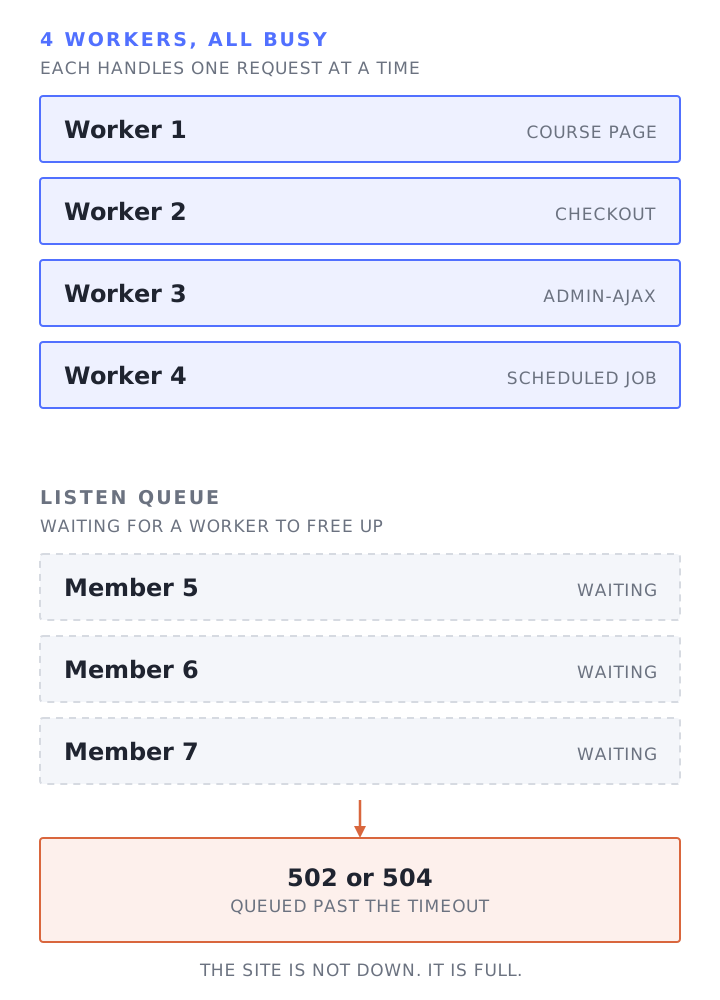
On a membership site the rush tends to come at the worst moments: the cart opens, a course cohort starts, or a live session begins and a crowd logs in within a few minutes.
Why membership sites use more workers
Pressable’s knowledge base has one of the clearest lists of what needs a worker: “Any uncached page load (HTML generated by WordPress). Most actions for logged-in users (like viewing the wp-admin dashboard or customer-specific content). Dynamic requests, such as adding an item to a cart, submitting a form, or using the checkout process in WooCommerce. WordPress REST API requests. Backend processes, like scheduled posts (wp-cron), running imports, or generating backups with a plugin” (Pressable).
Read that list as a membership site owner and much of your members’ activity is on it:
- Member pages. Dashboards, account pages and community feeds are usually specific to each member, so they typically skip the page cache. Lessons may or may not be, depending on your plugins. Kinsta: “The more dynamic a website is, the more PHP threads it will likely need” (Kinsta).
- Checkout and sign-up. WordPress checkout, registration and account-change requests typically run PHP, and payment-provider webhooks can add more PHP requests, depending on the integration.
- Background requests. On pages where WordPress or a plugin loads the Heartbeat API, it keeps checking in with the server, on “an interval (called the ‘tick’) to run every 15-120 seconds”, and “an admin-ajax handler” answers each check (WordPress). Course and community plugins can add their own AJAX or REST calls on top, for example to save progress or check notifications. Your browser’s network tab shows which ones your site makes.
- Scheduled jobs. WordPress’s WP-Cron is triggered by site visits by default (WordPress), and jobs that plugins schedule through it, such as reminder emails, run as PHP requests too.
None of this is a problem on its own. It becomes one when your busiest minute needs more workers than your plan has.
How many PHP workers do you need?
It starts with two numbers only your site can give you: how many requests reach PHP at peak, and the average time PHP spends on each. Memory and CPU then set limits on the answer. The relationship between them comes from queueing theory. Little’s Law says the long-run average number of items in a system equals the average arrival rate multiplied by the average time each item spends in it, “L = λW” (Wikipedia, citing Little 1961). For a PHP pool that becomes:
workers busy on average = requests reaching PHP per second × average PHP time per request, in seconds
Little’s Law works with averages, so use the mean time per request, not a percentile. Then add headroom, because traffic doesn’t arrive evenly: a launch minute is lumpier than the average suggests. The result is a long-run average, so headroom covers the bursts; check the margin against your queue data and a load test.
Memory is the second limit. Each worker holds its own memory, so the pool has to fit in the RAM left over after the database and web server. Tideways, a PHP profiling company, puts the rule as “(Total RAM - Memory used for Linux, DB, etc.) / process size” (Tideways). CPU is the third limit. Check CPU use at peak before you grow the pool.
Planning estimate
How many PHP workers does your site need?
The numbers filled in are an example. Replace them with your own measurements.
- workers (estimate)
The estimate needs JavaScript to calculate.
workers = round up((requests per minute / 60) x average seconds per request x headroom), minimum 1
A starting estimate from the numbers you enter, not a guarantee. It treats your busiest minute as steady, which real launches are not, and it doesn't check CPU: requests that are busy computing compete for the server's cores, so a larger pool needs CPU to match. Check the result against your host's PHP-FPM status page and a load test before you rely on it.
Why published rules of thumb for PHP workers disagree
Published PHP-worker recommendations use different measures: concurrent users, workers per CPU core, starting allocations per site, or results from a particular load test. These figures are not directly comparable, and only simultaneous requests that reach PHP occupy a worker. Two sites with the same headcount can need very different numbers, depending on how often each member’s page needs PHP and how long it takes.
Checked 19 October 2026.
Three terms are easy to confuse:
- Registered users are everyone with an account. Most are not on the site in any given minute, so this number says little about workers.
- Concurrent users are the people with the site open right now. Many are reading or watching a video between clicks, so each one sends a request to PHP only now and then.
- Simultaneous requests are the ones being processed at the same instant. Only these occupy workers, and only when they reach PHP instead of a cache.
The sum from earlier connects them: workers busy on average = requests reaching PHP per second × average PHP time. A headcount only becomes a worker count once you add how often each member triggers a PHP request and how long that request takes. Four made-up sites show how far the answer swings (illustrative numbers, not measurements):
| Site | Members online | Seconds between each member’s PHP requests | Requests per second | PHP time per request | Workers busy on average |
|---|---|---|---|---|---|
| A | 50 | 10 | 5 | 0.4 s | 2 |
| B | 50 | 2 | 25 | 0.4 s | 10 |
| C | 200 | 20 | 10 | 0.4 s | 4 |
| D | 200 | 5 | 40 | 1 s | 40 |
Sites A to D average 2, 10, 4 and 40 busy workers. Sites A and B have the same 50 members and differ fivefold, and a rule of one worker per member would give 50 and 200 against averages of 2 to 40. Those averages show why member counts alone do not size a pool, but they do not establish safe capacity; each site still needs measured headroom.
Some hosts and guides publish their own numbers. The last column shows what each one counts:
| Source | What it says | What it counts |
|---|---|---|
| WP-Tonic LearnDash hosting guide (modified 8 Jun 2026) | “Websites that have at least 50 concurrent users needs a minimum of 4-6 PHP workers.” | Concurrent users. No request rate or PHP time given. |
| Kinsta blog on PHP threads (modified 11 May 2026) | For larger sites with more dynamic functionality, “we’ve found 4 PHP threads to be a good starting point”, and it adds that this varies with themes, plugins, queries and the cached-to-uncached ratio. | A starting point per site, with the caveat built in. |
| Cloudways blog on PHP workers (updated 26 Jul 2023) | “Many ecommerce sites can benefit from utilizing 3 static workers per CPU core.” The same post says one LMS site “uses around 5-10 PHP workers” and one high-traffic store uses around 507 to 530. | Workers per CPU core, plus two real examples at least 50 times apart. |
| SpinupWP docs (modified 24 Feb 2026) | A load test of 0 to 250 simultaneous users on a 16GB, 8 vCPU server found 15 workers optimal. The docs say there is “no exact science” to adding workers. | One server, one test. Average response time rose from 395 ms at 15 workers to 416 ms at 100. |
| WordPressHostingServices.com guide (2 Feb 2026) | With 200 concurrent users and 20% of them in cart or checkout, it says you want enough workers for 40 to 50 sustained checkout requests plus background tasks. | Concurrent users multiplied by the assumed share in cart or checkout; it does not provide a request rate or PHP service time. |
These figures answer different questions, so do not treat them as interchangeable sizing rules. SpinupWP’s test reported 395 ms at 15 workers and 416 ms at 100. Measure request rate and PHP time, then load test the result; our guide to load testing a membership site with logged-in members covers the method. If logged-in pages are slow even though workers are free, the slow part is the requests themselves, so start with why WordPress is slow when logged in.
How to measure your own numbers
The calculator is only as good as what you put in. Three places to get real figures:
- PHP-FPM’s access log. It logs only requests that reached PHP, and its format can include
%d, the “time taken to serve the request”, and%M, the “peak of memory allocated by php” (PHP manual). Count the entries in your busiest minute and average%{milliseconds}dover the same entries (plain%dis in seconds), and you have the calculator’s first two inputs.%Mshows how much memory PHP allocated for a request, which is less than the whole worker process uses, so ask your host for the worker processes’ real memory under load for the memory check. Your host can switch the fields on if they aren’t there. If requests are already queuing or timing out, the FPM log alone can understate demand because requests that never reach PHP are absent. Ask your host to compare these measurements with incoming uncached requests, queue growth and gateway errors before sizing the pool. - The PHP-FPM status page. It shows how many processes are active and idle, the listen queue, and “max children reached” (PHP manual). A value above zero means the pool has hit its limit since PHP-FPM last restarted. Check whether that lines up with slow pages or errors in the same period. If your host doesn’t give you access to it, ask them to read it for you.
- Query Monitor. It isn’t a sizing tool, since it reports the page you’re looking at rather than your real traffic, but it’s the quickest way to see why a slow page is slow: the queries, plugins and time behind it (Query Monitor). Making slow requests faster cuts the workers you need as surely as adding more.
Before you buy more workers
More workers only help when requests are waiting for a free worker. If each request is slow because of one heavy query or a plugin doing too much work, more workers mean more slow requests running at once, all competing for the same CPU and database. Two questions to ask first:
- Are requests slow, or queued? Slow pages with an empty listen queue point at the requests themselves: profile them before changing anything, whether the fix turns out to be code, queries or caching. A queue that grows at peak means the pool is full; look at request time, the database, outside calls, CPU and memory before simply adding workers.
- Does the server have capacity for more workers? Check CPU and memory during the slowdown before increasing the pool. More workers can worsen contention when those resources are already exhausted.
For plans advertised as unlimited, ask the host which resource limits and fair-use terms apply.
How we size it
We don’t sell fixed plan tiers (how pricing works), so there’s no worker count to pick from a pricing table. We size hosting to each site, and configure and tune caching per site. On MemberPress sites we test object caching first, because MemberPress lists the Redis Object Cache plugin in its known incompatibilities. We load test with tools like loader.io and k6, as our concurrent users page describes. If you’d like us to look at yours, start with our free site speed audit.
Frequently Asked Questions
What is a PHP worker in WordPress?
A PHP worker is a server process that runs WordPress’s PHP code for one request at a time. The number of workers caps how many requests PHP can handle at the same moment. Pages served from a full-page cache without running PHP don’t use one.
How many PHP workers do I need for a membership site?
Multiply the requests that reach PHP per second in your busiest minute by the average PHP time for each, then add headroom for spikes. Ten requests a second at 0.4 seconds each keep four workers busy; with an example 50% headroom that’s six, though the right margin depends on your peak. The calculator on this page does the sum with your own numbers.
What happens when PHP workers run out?
New requests wait in a queue until a worker is free, so pages slow down. If requests wait or run too long, visitors can get timeouts or gateway errors; which error depends on the hosting stack. On membership sites this tends to happen when many members log in at once, such as a launch or a live session.
Do more PHP workers make a site faster?
Only when requests are queuing for a free worker. If each request is slow on its own, more workers let more slow requests run at once and compete for the same CPU and database. Fix the slow requests first, then size the worker pool.
What is the difference between PHP workers and PHP memory limit?
Workers set how many requests run at the same time. The memory limit sets how much memory a single request may use. Kinsta puts it as threads managing “concurrency” while the memory limit “manages resource allocation by restricting the memory usage of individual scripts” (Kinsta).
What are PHP threads on Kinsta?
PHP threads are Kinsta’s name for what other hosts call PHP workers. Kinsta’s docs describe them as “individual PHP processes responsible for handling incoming requests to your website” and say they were “previously known as PHP workers”. “Each thread processes one request at a time”, and the number depends on your plan and can be changed per site in MyKinsta (Kinsta). Adding threads within the same memory pool lowers the memory available to each one (Kinsta).