


WordPress Database Optimization for Membership Sites
Find growing tables, slow queries and lock waits in a WordPress membership database. Learn what to clean safely and which member records to preserve.

Safe to trim through supported tools: complete and canceled scheduled actions, expired transients and sessions, old log rows and spam. Don’t hand-delete orders, subscriptions, transactions, course progress or user meta. Before you change anything, measure slow queries, lock waits, autoloaded options and table growth, and retest the same logged-in pages afterward.
A generic cleanup pass can miss the important tables on a membership site and can create real risk, because renewals, orders, course progress and community activity write to the database all day, and some of those rows are the business itself. We check whether the database is the bottleneck before recommending a bigger server, because locks, bloated tables, missing cleanup and slow queries are often cheaper to fix than hardware. We have told clients an upgrade wasn’t needed.
Sources below are the WordPress, WP-CLI, MySQL, Action Scheduler, WooCommerce, MemberPress, BuddyPress, BuddyBoss and Query Monitor documentation and source code, checked on 19 October 2026. Citing a company’s documentation doesn’t mean it endorses this article, and product names are trademarks of their owners. MySQL quotes come from the 8.4 manual. Your host may run a different MySQL version or MariaDB, where details differ.
This article covers the database. For the wider question of why logged-in pages are slow, start with our nine-check runbook for WordPress slow when logged in.
How do I see which tables are big?
Ask the database for table sizes, largest first. wp db size --tables --orderby=size --order=desc does it from the command line, and a query against information_schema does the same in any SQL tool. Look for tables far bigger than your posts and users tables, then find the plugin that writes each one.
The WP-CLI wp db size documentation lists --tables (“Display each table name and size instead of the database size”), plus --orderby and --order (WP-CLI). Add --all-tables-with-prefix to include plugin tables that WordPress hasn’t registered:
wp db size --tables --all-tables-with-prefix --orderby=size --order=descOr run this read-only query. It lists every table in the connected database, regardless of the WordPress table prefix:
SELECT table_name,
       ROUND((data_length + index_length) / 1024 / 1024, 1) AS size_mib,
       table_rows AS approx_rows
FROM information_schema.TABLES
WHERE table_schema = DATABASE()
ORDER BY (data_length + index_length) DESC
LIMIT 20;
Save it as sizes.sql and run it with wp db query < sizes.sql, which is the form the wp db query documentation shows.
Treat the row counts as a guide. For InnoDB, MySQL says the row count “is an approximation, and may vary from the actual value by as much as 40% to 50%” (MySQL manual). Save the top 20 list as your baseline.
Where do membership site databases grow?
Membership databases grow in tables that record events: scheduled actions and their logs, sessions, security and activity logs, community activity and notifications, plus the options table. Orders, subscriptions, transactions, course progress and user meta also grow, but those are the business record. The table below separates the two. Your table prefix may differ from wp_.
Table (prefix wp_) | What writes it | Trim it? | How |
|---|---|---|---|
actionscheduler_actions, actionscheduler_logs (also _claims, _groups) | Action Scheduler, used by WooCommerce Subscriptions and other plugins | Complete and canceled rows, yes. Pending and failed, read first | Retention filter, wp action-scheduler clean |
options | WordPress core, themes and plugins that store options or transients | Expired transients, yes. Anything else only once you know the owner | wp transient delete --expired; autoload checks below |
woocommerce_sessions | WooCommerce cart and customer sessions | Expired rows, through WooCommerce’s own cleanup | Check that the cleanup runs |
wc_orders, wc_orders_meta, wc_order_addresses, wc_order_operational_data | WooCommerce order storage (HPOS) | No | These are your orders |
posts, postmeta | WordPress core, plus membership plugins | Revisions past a retention limit you choose. Not memberships, rules or orders | Have a developer handle it |
usermeta | Member profile fields and per-user plugin data | No | Have a developer find leftovers |
mepr_transactions, mepr_subscriptions | MemberPress | No | MemberPress uses transactions to decide access |
mepr_events | MemberPress event log | Rows older than a year, per MemberPress | Trim by age only |
mpcs_user_progress | MemberPress Courses | No | This is course progress |
bp_activity, bp_activity_meta, bp_notifications, bp_notifications_meta, bp_messages_* | BuddyPress; check the names on a BuddyBoss install | Old notifications and activity, by a date your community agrees | BuddyBoss’s BP Bulk Delete |
| Activity-log, audit and security plugin tables | The logging plugin | Yes, within your retention policy | The plugin’s own retention setting |
comments, commentmeta | WordPress | Spam, yes | Empty spam from the Comments screen |
Where each row comes from:
- Action Scheduler. Its FAQ says data lives in custom tables prefixed
actionscheduler_, and that it is “responsible for scheduling everything from emails to payments.” The table names are in its source:actionscheduler_actions,actionscheduler_claimsandactionscheduler_groups, andactionscheduler_logs. - WooCommerce. The order storage docs name four custom order tables:
wc_orders,wc_order_addresses,wc_order_operational_dataandwc_orders_meta. While synchronization is on, “the posts and post meta tables act as the backup tables,” so old-style order rows can still sit inpostsandpostmeta. Session rows live inwoocommerce_sessions, and the session handler source has acleanup_sessionsroutine that deletes expired rows. A comment there explains the cap on session lifetime: “We limit the expiration time to 30 days to avoid performance issues and the session table growing too large.” - MemberPress. Where is data stored? says “MemberPress uses the Transactions to determine if a user has access to a Membership, and for how long.” It stores memberships and rules as custom post types in
postsandpostmeta, and its settings and member custom fields inoptionsandusermeta. Of the event log it says: “This table can grow quite large over time, so it would be okay to trim events that were at least a year old. We don’t recommend trimming events that aren’t at least a year old.” The same page listsmpcs_user_progressfor MemberPress Courses. - BuddyPress. The BuddyPress schema source creates
bp_activity,bp_activity_meta,bp_notifications,bp_notifications_metaand thebp_messages_*tables. BuddyBoss says on its BP Bulk Delete page: “Large activity and notification tables slow down BuddyBoss page loads, increase backup times, and grow hosting costs on database-heavy hosting plans.” More on that in why BuddyBoss gets slow. - WordPress core. On revisions, the WordPress documentation says
WP_POST_REVISIONSdefaults to storing every revision, so WordPress keeps every revision by default. WithWP_POST_REVISIONSset to a positive integer, “Old revisions are automatically deleted when the post is updated again,” and “There is an API function to delete revisions, but there is no UI.” On spam, the Comments screen documentation says “all comments that are marked as Spam are deleted permanently” when you click Empty Spam.
One more pattern from our own work: activity-log and audit tables, options rewritten on every request, and MySQL temporary tables spilling to disk are common hidden causes of slow logged-in and admin pages.
Why is wp_usermeta so big?
Plugins can add multiple metadata rows for a user (add_user_meta() “Adds meta data to a user” and takes a $unique flag that defaults to false, per the WordPress function reference), so wp_usermeta can grow with both the member count and the amount of metadata stored. Rows from plugins you removed years ago can linger. To see which keys dominate, run this read-only query off-peak, because grouping a very large table is itself heavy work:
SELECT meta_key, COUNT(*) AS rows_for_key
FROM wp_usermeta
GROUP BY meta_key
ORDER BY rows_for_key DESC
LIMIT 25;
Don’t delete keys because they look unfamiliar. Hand the list to the developer who knows which plugins are installed. A related pattern we have seen: admin screens that list users time out on sites with tens of thousands of users, especially when the object cache has been switched off without anyone noticing or a plugin adds expensive database calls per row.
How big should the Action Scheduler tables be?
There is no universal target size. The current cleaner works from last_attempt_gmt, not the scheduled date, so use scheduled dates to investigate pending work. In the current Action Scheduler source, the cleaner removes complete and canceled actions older than 31 days by default, while the performance guide says “As of version 4.0.0, Action Scheduler retains failed actions for three months by default.” Count what you have by status:
SELECT status, COUNT(*) AS actions,
       MIN(scheduled_date_gmt) AS oldest_scheduled,
       MIN(last_attempt_gmt) AS oldest_attempt
FROM wp_actionscheduler_actions
GROUP BY status;
Complete or canceled actions whose last attempt is older than the configured retention period may mean cleanup is delayed, disabled or unable to keep up. In the current source the cleaner is itself a scheduled action that runs daily, so a stalled queue can stall cleanup too. Future-scheduled pending actions are normal. Overdue pending actions that keep accumulating warrant checking both queue triggers and processing throughput, including slow callbacks and database locks: see WP-Cron and Action Scheduler, which also covers how a backlog like this builds up.
What is safe to clean, and what must I keep?
Clean rows that exist only as a log or a cache: complete and canceled scheduled actions, expired transients, expired sessions, old log rows and spam. Keep anything that records what a member bought, owes or has learned: orders, subscriptions, transactions, course progress and user meta. Do the cleanup through the owning plugin’s own setting wherever one exists, not with raw DELETE statements.
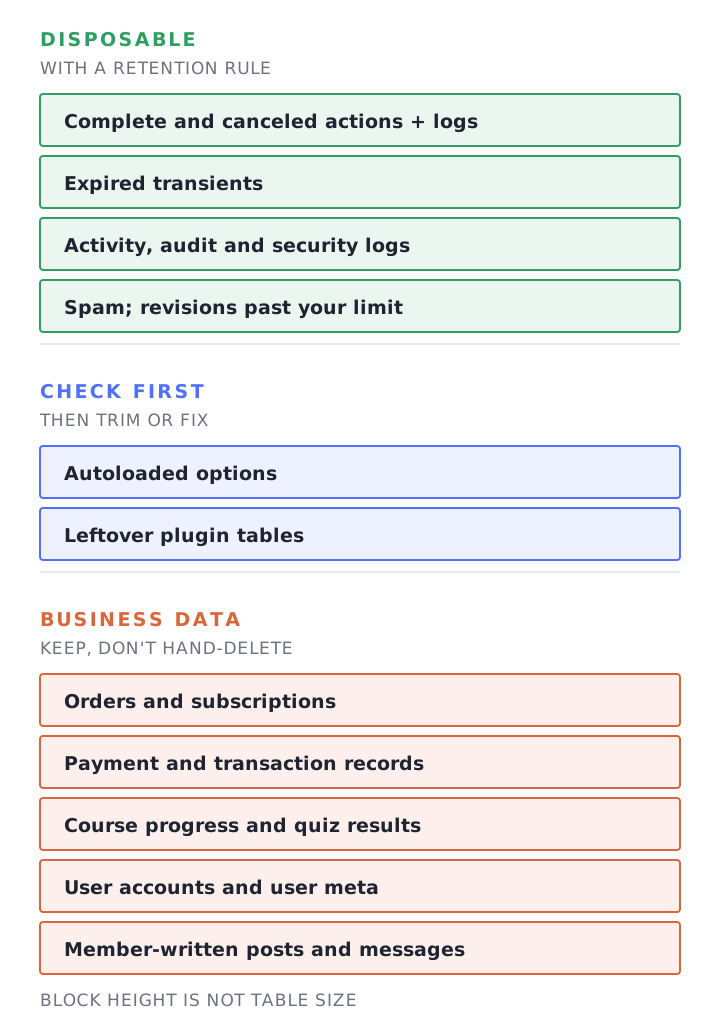
Cleanup steps
- Back up, then test the restore. Check free disk space first, because a full dump of a large database can fill the disk. By default
mysqldumpcan lock tables during the dump, which can block membership writes. If your host confirms that every dumped table uses InnoDB and no schema changes will run during the export, usewp db export /srv/private-backups/site-before-cleanup.sql --single-transaction --quick --skip-lock-tables, with an existing protected directory outside the web root. WP-CLI passes extra arguments tomysqldump, and MySQL’s manual says--single-transactiondumps “the consistent state of the database at the time when START TRANSACTION was issued without blocking any applications,” but that “only InnoDB tables are dumped in a consistent state” and no other connection should runALTER TABLE,DROP TABLE,RENAME TABLEorTRUNCATE TABLEduring the dump (MySQL manual). Otherwise, have the host choose a consistent backup method for your storage engines. If you leave the path out, WP-CLI generates the filename itself ({dbname}-{Y-m-d}-{random-hash}.sql, per the WP-CLI documentation), so a dump made from inside the WordPress folder can end up where the web server can serve it. Then restore that dump into a separate scratch database. A backup you haven’t restored is a guess. Restrict access to the dump, validate the restored users, orders and transactions against records from the same backup snapshot, and remove the dump according to your backup-retention policy. The same skill carries you through moving a membership site to a new host. - Save the “before” numbers. The top 20 table sizes, the Action Scheduler status counts and the autoload total from the checks in this article.
- Clean through the owning setting. See the list below.
- Measure again, then test the money paths. Sign-up, login, a renewal (in test mode if you have one), password reset, and course progress saving.
- Leave member data alone. Take problems in orders, subscriptions or progress to the plugin’s developer.
For step 3, the supported routes are:
- Complete and canceled scheduled actions. Action Scheduler’s
wp action-scheduler cleancommand takes--status,--before,--batch-sizeand--pause, and its default statuses arecanceledandcomplete(Action Scheduler WP-CLI docs). The retention period itself is theaction_scheduler_retention_periodfilter in the cleaner source. It is a filter, not a settings screen, so a developer sets it. Read failed actions before purging them, because on a membership site a failed action may be a renewal nobody has looked at. - Expired transients. Transients are cached values with an expiry. WordPress’s documentation says it “infrequently cleans out expired transients,” and that transients “should also never be assumed to be in the database, since they may not be stored there at all” (WordPress).
wp transient delete --expiredremoves the expired ones (WP-CLI). - Expired sessions. WooCommerce has its own cleanup routine for them, per the session handler source above. If the table is huge anyway, ask a developer to check that the cleanup runs.
- Activity and audit logs. Use the logging plugin’s retention setting, and keep rows as long as your compliance or support needs say.
- Community activity and notifications. BuddyBoss’s BP Bulk Delete lets admins “bulk delete old activity posts, group activity, private messages, and notifications based on an “older than” date filter” (BuddyBoss). Members wrote that activity and those messages, so agree the cutoff date with whoever runs the community before you pick one.
Two commands in step 3 change data. Both are destructive, so run them only after step 1:
# DESTRUCTIVE: removes expired transients only.
wp transient delete --expired

# DESTRUCTIVE: removes complete and canceled actions older than 60 days, in batches.
wp action-scheduler clean --status=complete,canceled --before='60 days ago' --batch-size=100 --pause=2
Why not use a cleanup plugin?
A generic cleaner can be fine for revisions and spam, but it doesn’t know your membership plugin’s data model. MemberPress, for example, keeps memberships and rules in posts and postmeta and its settings in options rows starting mepr_ or mp_ (MemberPress). A tool that deletes “orphaned” or “unused” rows by pattern can hit exactly those. If you use one, back up first, run it in report-only mode if it has one, and read every category it wants to delete.
Does OPTIMIZE TABLE speed up WordPress?
Rarely, on InnoDB. MySQL’s manual says “InnoDB stores data using a page-allocation method and does not suffer from fragmentation in the same way that legacy storage engines (such as MyISAM) do.” OPTIMIZE TABLE mostly matters after you delete a large share of a table, when it can reclaim the space.
The same manual page says “Delete operations might leave gaps that leave pages less filled than desired, which could make it worthwhile to optimize the table” (MySQL manual). That fits a big Action Scheduler or log purge. For InnoDB, OPTIMIZE TABLE “is mapped to ALTER TABLE ... FORCE, which rebuilds the table,” so it carries the costs of a rebuild:
- For regular and partitioned InnoDB tables, MySQL normally uses online DDL, and “An exclusive table lock is only taken briefly during the prepare phase and the commit phase of the operation.” That brief lock is why the metadata lock section below matters. Tables with
FULLTEXTindexes, servers withold_alter_tableenabled and servers started with--skip-newuse the table-copy method instead, and the manual says “MySQL locks the table during the time OPTIMIZE TABLE is running” whenever the operation isn’t online. - During the prepare phase “an intermediate table is created.” Before a rebuild, have the host budget space for the intermediate table, temporary sort files and concurrent-change logs. Check both the data and temporary filesystems; room for one extra table may be insufficient (MySQL manual).
- WP-CLI’s
wp db optimize(“Optimizes the database,” per the documentation) works on the whole database. After a purge, ask your host to optimize just the one big table in a quiet window.
What are autoloaded options, and how do I check them?
Autoloaded options are configuration settings that WordPress loads with every page load (WordPress handbook). WordPress 6.6 added the 800 KB Site Health warning and new autoload states. Its default size rule disables autoloading for newly added or changed values above 150,000 bytes unless autoloading is explicitly enabled; it does not migrate untouched older rows (Make WordPress Core).
Options saved before 6.6 keep the autoload value they had, and after 6.6 the column holds several values. The default list Core treats as autoloaded is yes, on, auto-on and auto, so the queries below check every one of them. They give the total, then the 20 biggest options:
SELECT ROUND(SUM(LENGTH(option_value)) / 1024) AS autoload_kib
FROM wp_options
WHERE autoload IN ('yes', 'on', 'auto-on', 'auto');

SELECT option_name, ROUND(LENGTH(option_value) / 1024) AS kib
FROM wp_options
WHERE autoload IN ('yes', 'on', 'auto-on', 'auto')
ORDER BY LENGTH(option_value) DESC
LIMIT 20;
The name prefix usually tells you the owner. Options left by plugins you removed are the safest targets, but have the developer confirm, because an option that every page needs should stay autoloaded. Back up, change one option at a time, and measure again. The runbook covers the Site Health check that flags oversized autoload.
How do I find slow queries?
Use Query Monitor for one request, then ask the host for a time-bounded slow-query-log capture during the problem window. For database diagnosis, check each slow entry’s Lock_time, whether Slow_queries changes during that window and whether EXPLAIN reports Using temporary. The wider logged-in-slowness runbook covers the general setup.
Query Monitor shows “Database queries, including notifications for slow, duplicate, or erroneous queries,” filterable by type, responsible component and calling function (Query Monitor). It also names the plugin or theme behind each query.
The slow query log is off unless your host turned it on: “By default, the slow query log is disabled,” and the default long_query_time is 10 seconds (MySQL manual). Ask your host to enable it with a lower threshold for a limited capture window, with log rotation, disk alerts and access restricted because logged statements can contain sensitive values. Disable it after the capture. Two details matter:
- Statements are logged after execution, and “The time to acquire the initial locks is not counted as execution time.” A request delayed by locks may never qualify for the slow log, so inspect live lock waits during the incident (see the locks section below).
- Compare
SHOW GLOBAL STATUS LIKE 'Slow_queries';before and after the problem window. The counter “increments regardless of whether the slow query log is enabled” (MySQL manual); an increase means queries somewhere on the server crossedlong_query_time(it can’t tell you which site they came from), and no increase doesn’t rule out database slowness.
Temporary tables are the third thing to check. To see whether a query needs one, run EXPLAIN and “check the Extra column to see whether it says Using temporary.” When an in-memory temporary table passes the tmp_table_size limit, MySQL “automatically converts the in-memory internal temporary table to an InnoDB on-disk internal temporary table” (MySQL manual). The default limit is 16 MiB.
What does “Waiting for table metadata lock” mean?
It means a statement is waiting for another session to release its hold on a table’s metadata. A long-running or idle transaction holds the lock, a schema change such as ALTER TABLE waits for it, and MySQL’s manual says a pending request of that kind “blocks subsequent transactions on the table.” Everything touching that table queues behind it.
To keep transactions consistent, the server works by “acquiring metadata locks on tables used within a transaction and deferring release of those locks until the transaction ends” (MySQL manual). The online DDL page adds that “a pending exclusive metadata lock requested by an online DDL operation blocks subsequent transactions on the table” (MySQL manual). MySQL lists “Waiting for table metadata lock” among the thread states that indicate a wait for a metadata lock.
On a site, that looks like pages that touch one table hanging while the server looks idle. PHP’s manual describes the web server handing each request “to one of the children that is not already serving another client” (PHP manual), so a request waiting on the database keeps its worker busy and the pool can fill. PHP workers for membership sites explains how that pool works. When we see the state, it often appears at regular times, and the usual cause is a long transaction or a schema change, such as a backup tool or a plugin altering tables.
To look, ask your host or developer to run read-only statements:
SHOW FULL PROCESSLIST;
SELECT * FROM sys.schema_table_lock_waits;
SHOW PROCESSLIST needs the PROCESS privilege to see other users’ threads, and without FULL it “displays only the first 100 characters of each statement” (MySQL manual). On MySQL 8, the sys.schema_table_lock_waits view covers the same ground: the manual says these views “display which sessions are blocked waiting on metadata locks, and what is blocking them” (MySQL manual). The view also prints ready-made KILL statements. Don’t run those yourself. Ending a session is a decision for whoever runs the database.
Then work out what the blocker is. If it recurs at the same time every day, look at what runs on a schedule: backups, cron jobs, optimize runs. Action Scheduler’s own docs warn that running similar actions in parallel “can lead to database locks or other issues” (Action Scheduler). The usual fix is to find why a transaction stays open and move schema changes, backups and OPTIMIZE TABLE out of the hours when members are active.
Does object caching change any of this?
A persistent object cache can reduce trips to the database, but it does not shrink tables or repair a slow query. It also changes where transient data may live. WordPress says transients may be stored outside the database, so plugin compatibility and measurements should decide whether persistent caching belongs on the site. The WordPress handbook says that without one, “your web server must read those options from the database to handle every page view.” Whether you can run one depends on your membership plugins. Redis object cache for membership sites covers what each plugin’s own documentation says.
Which MySQL settings should I check with my host?
Ask about five things, and compare each against the numbers from your own site, not a number from a forum. The right values depend on the server’s memory and your data size, and your host sets them. The table shows a read-only way to see each one.
| Setting | What it controls | How to look |
|---|---|---|
| InnoDB buffer pool size | Memory InnoDB uses to cache table and index data | SHOW GLOBAL VARIABLES LIKE 'innodb_buffer_pool_size'; against your total data and index size |
| Buffer pool misses | Reads that had to go to disk | SHOW GLOBAL STATUS WHERE Variable_name IN ('Innodb_buffer_pool_reads', 'Innodb_buffer_pool_read_requests'); |
| Temporary tables | When temp tables spill to disk | SHOW GLOBAL STATUS WHERE Variable_name IN ('Created_tmp_disk_tables', 'Created_tmp_tables'); |
| Max connections | How many simultaneous client connections are allowed | SHOW GLOBAL VARIABLES LIKE 'max_connections'; and SHOW GLOBAL STATUS LIKE 'Max_used_connections'; |
| Slow query log | Whether slow statements are recorded | SHOW GLOBAL VARIABLES WHERE Variable_name IN ('slow_query_log', 'slow_query_log_file', 'long_query_time'); |
Status counters such as these accumulate while the server runs, so record two snapshots over the problem window and compare their changes. Each SHOW STATUS call itself “uses an internal temporary table and increments the global Created_tmp_tables value” (MySQL manual), and MySQL notes that Created_tmp_disk_tables does not count on-disk temporary tables created in memory-mapped files.
The buffer pool is “an area in main memory where InnoDB caches table and index data as it is accessed” (MySQL manual). Innodb_buffer_pool_reads is “The number of logical reads that InnoDB could not satisfy from the buffer pool, and had to read directly from disk.” A busy Innodb_buffer_pool_reads count next to a data size much larger than the pool is a reason to talk about memory. Created_tmp_disk_tables is incremented when a temporary table is created on disk, and MySQL says that if too many are, “consider adjusting the engine-specific limits” (MySQL manual). max_connections defaults to 151 in MySQL 8.4 (MySQL manual), and Max_used_connections is “The maximum number of connections that have been in use simultaneously since the server started.” If the two are close, find out why before raising the limit.
Also ask about disk space. Rebuild space needs a budget, as covered above, and log files that grow without limits can fill a disk and take a site down, so log rotation and disk size alerts matter on a busy site.
When is it capacity, not the database?
If table growth, slow queries, locks and autoloaded options do not explain the slowdown, check capacity during the busy period. PHP worker saturation, CPU pressure or memory pressure can make logged-in pages slow even when the database looks healthy. Measure those resources before deciding whether the site needs more server capacity. Start with PHP workers for membership sites, which has a sizing calculator, and the runbook.
If you’d like a second opinion on whether the database or the server is the limit, get a free site speed audit. It uses synthetic load tests to measure concurrency and PHP worker usage.
Frequently Asked Questions
These answers cover the cleanup questions that matter most on a membership site. Keep payment, access, course and member records; trim only disposable data through supported tools; and measure before and after. When a table or query is unclear, stop and ask the plugin developer or host before deleting anything.
Is it safe to use a database cleanup plugin on a membership site?
Only with care. A generic cleaner doesn’t know where your membership plugin keeps its data: MemberPress, for instance, stores memberships and rules in the posts tables and settings in options rows starting mepr_ or mp_. Back up and test the restore first, limit the tool to revisions, spam and expired transients, and read every category it wants to delete before you click.
Can I delete the Action Scheduler tables?
Don’t drop them. Pending actions in those tables can include renewals and emails, and Action Scheduler says it is “responsible for scheduling everything from emails to payments”. Trim complete and canceled rows with the retention filter or wp action-scheduler clean, and read failed actions before purging them.
How big is too big for a WordPress database?
WordPress publishes an 800 KB Site Health threshold for autoloaded options, not for the database as a whole. For the database overall, growth in a table that is only a log, a table far larger than your posts and users tables, and a data size well beyond the InnoDB buffer pool are better warnings than total gigabytes.
Does optimizing the database speed up WordPress?
Cleaning disposable rows, trimming oversized autoloaded options and fixing slow queries can. Running OPTIMIZE TABLE on InnoDB mostly reclaims space after a large delete, and MySQL’s manual says InnoDB “does not suffer from fragmentation in the same way that legacy storage engines (such as MyISAM) do.” Measure before and after rather than assuming.
What does “Waiting for table metadata lock” mean?
A statement is waiting for another session to release its lock on a table’s structure. Usually a long transaction holds the lock and a schema change is queued behind it, and MySQL says that pending change “blocks subsequent transactions on the table.” Ask your host to inspect the process list and, on MySQL 8, sys.schema_table_lock_waits to identify the waiting and blocking sessions before changing schedules or ending a connection.