


WP Engine Pricing for Membership Sites, Kinsta and Cloudways Compared
WP Engine Essential costs $35 a month (from $28 billed annually) and Business from $400. How WP Engine, Kinsta and Cloudways count traffic and charge overages.

WP Engine’s Essential plan costs $35 a month on monthly billing for 25,000 visits, or $28 a month for the first year on annual billing; Business starts at $400 a month billed annually, and Enterprise is by quote. Kinsta’s single-site plans start at $35 a month ($30 billed annually) and charge $0.50 per 1,000 visits over the allowance, while WP Engine publishes its $2 per 1,000 overage only for older plan names. Cloudways lists visits as unlimited or unmetered: Flexible is priced by server size from $11 a month, and Autonomous costs $99 to $399 a month plus capped hourly autoscaling.
Sources below are the vendors’ own pricing pages and documentation, checked on 19 October 2026. Citing a company’s documentation doesn’t mean it endorses this article, and product names are trademarks of their owners. We run a competing host, MemberHost, so we stuck to listed prices and each vendor’s own words.
Prices change. Every figure in the tables below was read from the vendor’s own pages on 19 October 2026. All are in US dollars. Kinsta and Cloudways say their prices exclude tax, and WP Engine says taxes may apply at checkout. Where a vendor does not publish a number, we say “not published” instead of guessing.
How does WP Engine price a membership site?
WP Engine lists three plans: Essential from $28 a month billed annually, Business from $400 a month billed annually, and Enterprise by quote. Essential comes in four sizes, each with a monthly visit allowance. The figures below are from WP Engine’s plans page.
| Essential size | Sites | Visits per month | Storage | Bandwidth | Monthly billing | Annual billing (first year) |
|---|---|---|---|---|---|---|
| 1 site | 1 | 25,000 | 10 GB | 75 GB | $35 | $336 a year ($28 a month) |
| Up to 3 sites | 3 | 75,000 | 15 GB | 150 GB | $65 | $624 a year ($52 a month) |
| Up to 10 sites | 10 | 100,000 | 20 GB | 240 GB | $130 | $1,248 a year ($104 a month) |
| Up to 30 sites | 30 | 400,000 | 50 GB | 550 GB | $330 | $3,168 a year ($264 a month) |
The annual prices include a promotional rate. WP Engine’s footnote says “First year pricing and associated coupons are valid for new customers purchasing Essential plans only” and “Product renewal pricing subject to change”, and the renewal price is not published on the page. The page also says “Taxes and overages may apply during checkout.”
Business is listed as starting at $400 a month, billed annually, with isolated resources, 24/7 chat and phone support, managed site migrations and a 99.99% uptime SLA. Enterprise has no price (“Work with our team of experts to shape a custom solution”). Essential is labeled a “Shared” environment, and Business and Enterprise “Isolated”.
The visits row on the plans page carries a warning that matters for membership sites: “Numbers are estimates only. Get in touch for dynamic sites or traffic spikes.” It lists Essential at 25,000 to 400,000 visits, Business at 400,000 to 800,000 and Enterprise at 800,000 and up.
What does WP Engine charge when you go over the visit allowance?
WP Engine’s overage page says customers on “Startup, Professional, Growth, Scale, Agency Essentials, Agency Plus, or Agency Pro plans will incur an overage cost of $2 per 1,000 extra monthly visitors.” It names those older plans and does not mention Essential or Business, so we could not confirm the Essential rate from WP Engine’s pages. Ask for it in writing before you buy.
What the pages do confirm: “We never throttle customers or cut their sites off for getting a traffic spike.” Overage is billed monthly even on annual plans, and visits “cannot be purchased as a product extension and instead can only be increased by upgrading the hosting plan” (WP Engine, billable visits).
Two more things are missing from the pages we checked. On the plans page, automatic updates and uptime monitoring are optional add-ons on Essential, and Business and Enterprise include one license each. Advanced DDoS and managed WAF is optional across tiers. Application performance monitoring and premium onboarding are optional on Business and Enterprise and not included on Essential. Add-on prices are not shown. And WP Engine’s PHP workers article explains how workers handle requests but gives no worker count per plan.
How do WP Engine, Kinsta and Cloudways count traffic?
WP Engine and Kinsta bill on visits, where a visit is a unique IP address per day rather than a page view. Kinsta also sells plans billed on server bandwidth instead. Cloudways Flexible lists unlimited visits, and Autonomous lists visits as unmetered and bills autoscaled containers by the hour.
| Plan type | What the bill is based on | The vendor’s words |
|---|---|---|
| WP Engine Essential and up | Visits | ”A single visit is one unique IP address logged per day (UTC).” Known and suspected bots are not counted (source) |
| Kinsta, visit plans | Visits | ”the sum of the unique IP addresses seen each 24-hour period as recorded in the logs.” “Visits served from the edge cache, or CDN cache, are still counted as visits.” (source) |
| Kinsta, bandwidth plans | Server bandwidth | ”Only data delivered directly from the server is counted; anything served by a CDN or edge cache is excluded.” (source) |
| Cloudways Flexible | Server size, billed hourly | ”Unlimited Visits” (source) |
| Cloudways Autonomous | Plan plus autoscaled container hours | ”Visits: Unmetered” (source) |
Why do membership sites hit these models differently?
A billable visit is one IP address on one day, so a logged-in member who opens 40 pages in a sitting counts once, the same as an anonymous reader who opens one. Cache does not lower the visit bill either: Kinsta states that edge cache hits still count. Membership sites often generate more uncached PHP work because personalized pages usually bypass shared page cache.
Three details of the definitions change the count.
- Regular members add up. If 1,000 members visit on 12 days and each uses a distinct, stable IP address on each of those days, that is 12,000 visits under the stated IP-per-day definition.
- Shared connections collapse. WP Engine says two people in the same office count as one visit because their IP addresses look the same, and Kinsta says the same for one connection on one day. Members on a school or company network can count less than you expect.
- Bots are partly filtered. WP Engine does not count known or suspected bots. Kinsta excludes “most well-known” bots, but warns that “some bots might be included in your total visits count”.
Kinsta also advises against sizing from Google Analytics: “Google Analytics does not generate any value that is directly comparable to our visit count.”
To make a rough planning estimate:
- Pull a month of access logs from the live site.
- Estimate unique IP addresses for each day, keeping a separate total for traffic positively identified as bots.
- Compare a range against each vendor’s documented exclusions; do not assume your log tool filters the same requests.
- Ask the vendor to validate the estimate before treating it as billable visits.
What do Kinsta plans cost?
Kinsta lists single-site plans billed on monthly visits or on server bandwidth, starting at $35 a month on monthly billing and $30 a month on annual billing. Above the allowance, Kinsta charges $0.50 per 1,000 visits, or $0.50 per GB of server bandwidth on bandwidth plans. Figures are from Kinsta’s pricing page and overages page.
| Plan (visit-billed) | Visits per month | Monthly billing | Annual billing: vendor’s rounded monthly display | Storage | Default PHP threads |
|---|---|---|---|---|---|
| Single 35k | 35,000 | $35 | $30 ($350 a year) | 10 GB | 2 |
| Single 65k | 65,000 | $50 | $42 ($500 a year) | 10 GB | 4 |
| Single 125k | 125,000 | $90 | $75 ($900 a year) | 10 GB | 6 |
| Single 315k | 315,000 | $170 | $142 ($1,700 a year) | 10 GB | 6 |
| Single 500k | 500,000 | $290 | $242 ($2,900 a year) | 15 GB | 8 |
| Single 750k | 750,000 | $375 | $313 ($3,750 a year) | 15 GB | 8 |
These are Kinsta’s default thread counts (PHP documentation). You can redistribute the existing PHP memory pool between threads; increasing the pool costs extra. More threads leave less memory per thread, so test the setting against your workload (configuration documentation). Kinsta says annual billing “gives you two months free compared to paying monthly”, and offers “a first month free on select plans for new customers”.
Kinsta’s page also lists a second family of plans, Launch through Lead. They list “Estimated monthly visits”, an included server bandwidth allowance (15, 25, 40, 65, 125 and 275 GB), and 4 default PHP threads each. Kinsta’s overages page gives $0.50 per 1,000 visits for visit-based plans and $0.50 per GB for bandwidth-based plans, and does not say which applies to these, so we have not drawn them on the chart below. Their annual invoices are $350, $590, $690, $990, $1,690 and $2,990 respectively.
| Plan | Estimated monthly visits | Included server bandwidth | Monthly billing | Annual billing: vendor’s rounded monthly display | Storage |
|---|---|---|---|---|---|
| Launch | 75,000 | 15 GB | $35 | $30 | 15 GB |
| Launch Plus | 125,000 | 25 GB | $59 | $50 | 25 GB |
| Build | 200,000 | 40 GB | $69 | $58 | 30 GB |
| Expand | 350,000 | 65 GB | $99 | $83 | 40 GB |
| Scale | 650,000 | 125 GB | $169 | $141 | 50 GB |
| Lead | 1,500,000 | 275 GB | $299 | $250 | 60 GB |
Kinsta’s plan table marks Single 20GB and Single 35k “No” under “Recommended for ecommerce / membership sites”. Enterprise starts at $500 a month.
What happens to the bill as visits grow?
The chart shows each plan’s listed monthly price through its allowance. Kinsta’s lines then rise at its published $0.50 per 1,000 visits. WP Engine’s lines stop at the allowance because its published overage rate names only older plans. Ask WP Engine for the current plan’s rate.
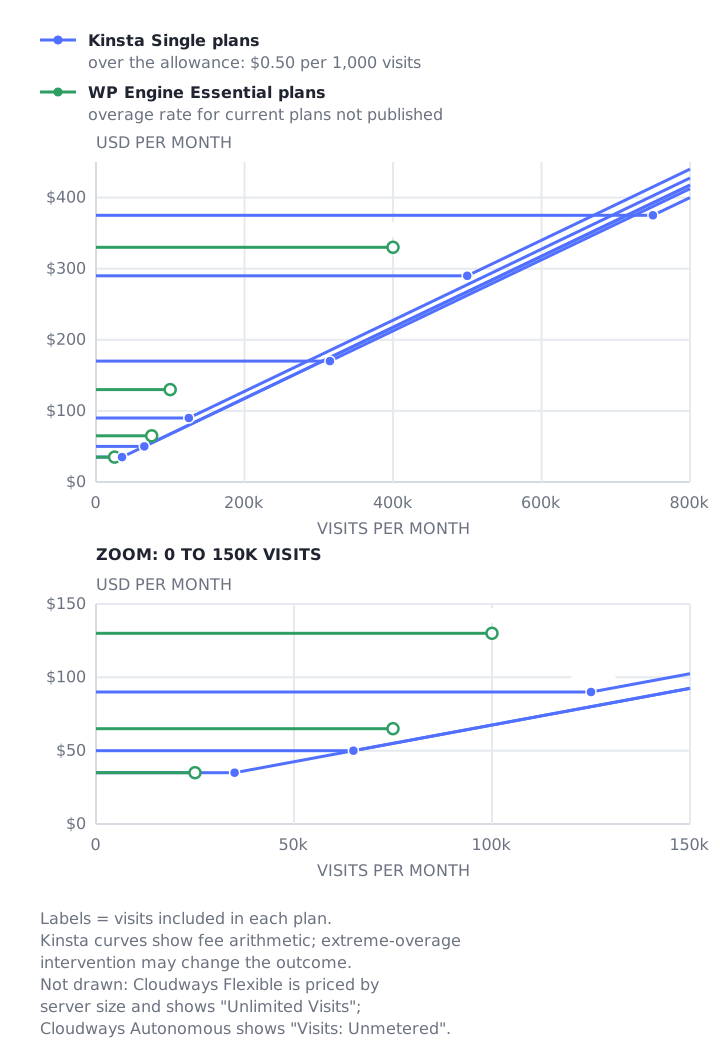
Listed prices, checked 19 October 2026. Not a quote; your bill depends on how each vendor counts your traffic. Kinsta curves show fee arithmetic; extreme-overage intervention may change the outcome.
Reading the listed numbers:
- Kinsta’s overage and its next plan up price visits differently. Moving up a Single plan costs between $0.34 and $0.67 per extra 1,000 included visits at monthly-billing list prices, against $0.50 to go over. From 35k to 65k it is $15 for 30,000 visits ($0.50 per 1,000), and from 65k to 125k it is $40 for 60,000 ($0.67). Neither route is always cheaper, and the plans also differ in threads and storage.
- Kinsta can act on a large overage. It defines an extreme overage as one “as large or larger than the cost of your hosting plan, or $500, whichever is less”. On Single 35k that threshold is $35, which 105,000 billable visits reach (70,000 over the allowance). Kinsta “may opt to resolve the overage sooner by requiring immediate payment of the overage or requiring that you upgrade to a suitable plan”, and reserves “the right to temporarily limit access to the site or a resource hosted on our servers until the overage has been acceptably resolved.” The Kinsta lines show fee arithmetic; that intervention may change the outcome.
- WP Engine’s lines have no slope because its pages publish no overage rate for current plans. Whether the legacy rate applies to Essential or Business is not stated.
- Cloudways has no line. Flexible lists unlimited visits and Autonomous lists visits as unmetered, so a visit curve does not apply to either.
What do Cloudways Flexible and Autonomous cost?
Cloudways sells two products. Flexible is a managed cloud server billed by size and by the hour, with prices starting at $11 a month and “Unlimited Visits”. Autonomous is managed WordPress at $99, $199 or $399 a month that adds hourly charges for autoscaled containers. Both are on Cloudways’ pricing page.
Cloudways Flexible
Cloudways Flexible lists an entry price of $11 a month (“starting at $11/month” in its FAQ). Your price depends on the provider, server type and size you choose when launching a server, and Cloudways says “pricing varies by region” for some providers. It shows an introductory offer of 30% off for three months on all plans. Cloudways bills “hourly” and “in arrears”, and charges extra bandwidth on DigitalOcean at $0.02 per GB. Its page says Object Cache Pro is free “on 4GB server or above” in one panel, and lists it as free without a size in another.
Cloudways Autonomous
| Plan | Per month | Baseline autoscale servers | Bandwidth | Disk | Autoscaling beyond baseline |
|---|---|---|---|---|---|
| Growth | $99 | 1 | 150 GB | 20 GB | $0.07 per container hour |
| Scale | $199 | 2 | 250 GB | 50 GB | $0.10 per container hour |
| Plus | $399 | 3 | 1,000 GB | 100 GB | $0.12 per container hour |
Each plan lists “Visits: Unmetered” and “PHP Workers: 100/server”. Disk overage is $1 per GB and bandwidth overage $0.04 per GB, and in Cloudways’ Autonomous billing article the visits row reads “Free”. Autoscaling has a ceiling you set: “You can also set Autoscaling Budget Thresholds to control your maximum autoscaling cost.” Cloudways says that once the budget is reached, autoscaling “automatically pauses”, and that bandwidth and disk can still produce overage charges while it is paused.
Cloudways’ own autoscaling example is four additional pods at $0.10 an hour for three hours, which comes to $1.20. When traffic drops, “the extra pods are removed automatically.”
Cloudways uses two scopes on the page: it markets “Unlimited PHP Workers” and lists “PHP Workers: 100/server” in each plan. Ask how the per-server count and autoscaling limits apply to your workload.
What costs sit outside the plan price?
Several documented add-ons and overages sit outside the headline plan price. Kinsta lists Redis and PHP performance add-ons. Cloudways lists a paid support add-on, and WP Engine shows add-ons on its plans page without prices. Each row below links to the vendor’s own source.
| Vendor | Item | Listed price |
|---|---|---|
| WP Engine | Add-ons: updates and uptime monitoring (optional on Essential), advanced DDoS and WAF (optional on all tiers), performance monitoring and premium onboarding (optional on Business and Enterprise) | Not published on the plans page (source) |
| WP Engine | Storage and bandwidth overage | Not published on the overage page (source) |
| Kinsta | Redis caching | $100 per site per month (source) |
| Kinsta | PHP performance (additional PHP memory) | $10 per additional 500 MB of PHP memory per month, prorated (source) |
| Kinsta | Disk space | Add-on $20 per 20 GB a month (pricing); overage $2 per GB a month (overages) |
| Kinsta | CDN bandwidth over the limit | $0.05 per GB (source) |
| Kinsta | Extra site, extra backups, premium staging | $30 per site; $20 (6-hourly) or $100 (hourly) per site; $20 per environment, all per month (source) |
| Cloudways | Advanced Support (the pricing page calls it “Advance Support”), which “extends to plugins/themes troubleshooting” | Standard support is included. Advanced Support is the higher of $100 a month or 10% of the invoice, with a six-month minimum commitment; a $25-a-month flat promotion is advertised (support page) |
| Cloudways | Cloudflare Enterprise CDN on Flexible | From $4.99 per domain per month (source) |
| Cloudways | Autoscaling on Autonomous | $0.07, $0.10 or $0.12 per container hour, with a budget cap (source) |
Kinsta documents its PHP add-on with an example: raising a plan’s 1.5 GB PHP memory pool to 3 GB for one site is a 1.5 GB increase, “therefore, you will be charged $30 per month for the add-on”. Because the add-on is prorated, Kinsta’s add-on page advises: “Enable the PHP Performance add-on before a launch or a busy period. Disable it when traffic settles.”
On the Redis add-on, Kinsta says membership sites are among those that “don’t make great use of page caching”, and warns “It is critical that you test your site thoroughly after enabling object caching”. Whether it suits your membership plugin is a separate question.
Do visits tell you how much capacity a plan gives you?
No. A visit allowance is a billing measure, and PHP capacity is a separate limit. Kinsta publishes default PHP threads per plan (2 on Single 35k, 8 on Single 750k). WP Engine does not publish a worker count per plan, and Cloudways Autonomous lists 100 PHP workers per server. Each thread or worker handles one uncached request at a time.
Kinsta’s table makes the point: Single 125k and Single 315k both list 6 default threads, though the monthly prices differ by $80. Personalized member pages usually bypass shared page cache, so they can consume those threads.
Storage, the number of sites and which add-ons you can buy also vary by plan, and none of them follows from a visit count. For how to estimate the workers a membership site needs, see our PHP workers guide and concurrent users page. To see how a plan copes with logged-in members before you commit, follow our load testing guide.
How do you model each vendor’s cost?
Each vendor’s bill is modeled from a different input: billable visits for WP Engine and Kinsta, server size and hours for Cloudways Flexible, and the baseline plan plus autoscaling for Autonomous. Use the points below to set up a like-for-like quote comparison. They compare billing models, not capacity.
- WP Engine’s Essential pricing is easiest to model when you can estimate billable visits and obtain the current plan’s overage rate in writing.
- Kinsta’s visit billing is easiest to model from its visit definition; bandwidth billing offers another basis when you can estimate origin transfer.
- Cloudways Flexible is modeled from server size and hours. Autonomous is modeled from the baseline plan, autoscaling budget, and storage or bandwidth overages.
Match threads or workers, storage, site limits, and support separately. If you are also weighing managed hosting against a VPS, our VPS comparison covers that choice.
How does MemberHost price this?
MemberHost has no public plans; pricing is bespoke. Our homepage names four factors that set the price: Traffic, Site complexity, Concurrent users and Traffic spikes (what sets your price). Each client gets their own node or cluster with dedicated resources. Migration in is free, and the free performance audit uses synthetic load tests of concurrency and PHP worker usage.
If you are comparing quotes and want a second set of numbers, get a free site speed audit or talk to us. For how MemberHost compares on resources and support, see MemberHost vs WP Engine, vs Kinsta and vs Cloudways.
Frequently Asked Questions
How does WP Engine count visits?
A billable visit is “one unique IP address logged per day (UTC)”, counted from server logs. Pages and other dynamic requests count. Static files, known and suspected bots and requests that return a 403 do not, and visits add up across all environments on the plan (WP Engine).
Does Kinsta charge for bots?
Kinsta does not count visits from “most well-known” bot user agents, but it says “some bots might be included in your total visits count” because its servers still have to serve them. Visits to wp-login.php and requests that return errors such as 401, 403 and 429 are not counted either (Kinsta).
Is Cloudways cheaper than Kinsta?
The listed prices measure different things. Cloudways Flexible charges for a server whose price depends on the provider, type and size you choose, and lists unlimited visits. Kinsta’s Single 125k visit plan is $90 a month on monthly billing, with a visit allowance and published PHP threads. Cloudways includes standard support. Its Advanced Support normally costs the higher of $100 a month or 10% of your invoice, with a six-month minimum commitment (Cloudways support), and a $25-a-month flat promotion is advertised; confirm its eligibility and terms. Compare the same scope on both quotes.
What happens if I go over my visit limit?
On WP Engine, “We never throttle customers or cut their sites off for getting a traffic spike”, and overage is billed monthly (WP Engine). Kinsta says “we’ll keep your sites running but charge you an overage fee” and may require payment or an upgrade, or temporarily limit access, in the case of an extreme overage (Kinsta). Cloudways lists visits as unlimited, unmetered or free.
Do logged-in members count as visits?
Yes, on the visit-billed plans. Members count under the same rule as anyone else: one unique IP address per day. Kinsta does not count visits to wp-login.php, but the member’s later page loads that day count as one visit, and a member who returns on another day counts again.