


How to Load Test a Membership Site With Logged-In Members
A step-by-step way to load test a WordPress membership site as logged-in members, with a free k6 script, how to read results, and how to compare hosts fairly.

To load test a membership site, copy it to a test environment, create one test member account per simulated user, and have each simulated member log in once and then browse the pages real members use, while the number of members ramps up. Watch the error rate and the 95th percentile response time as users are added, and note where response time stops being flat and starts to climb. A test that only requests the homepage mostly measures your page cache.
Below is a free k6 script that runs this test (download membership-load-test.js), plus what each setting does, how to read the numbers, and how to use the same test to compare two hosts. The script reads test member logins from a file, logs each one in, checks that every page shows a logged-in member, and, after the first minute, stops itself if failed requests or checks reach 1% or more.
This script measures authenticated HTML requests. It does not execute page JavaScript, fetch embedded assets, or reproduce background API requests, video playback, or lesson completion. Open your browser’s Network panel on a real member journey before you treat these results as a capacity estimate. Grafana separates protocol-level testing from browser testing: a protocol-based script’s response times “do not include frontend metrics such as the time taken for images to render on a browser” (k6 docs, load testing websites).
Sources below are the vendors’ own documentation and WordPress’s own source code, checked on 19 October 2026. Citing a company’s documentation doesn’t mean it endorses this article, and product names are trademarks of their owners.
What does a fair load test of a membership site look like?
A fair test behaves like your members. Each simulated member logs in, stays logged in, visits the pages members use, pauses between clicks, and arrives gradually instead of all at once. A test that hammers one anonymous URL is mostly answered from the page cache, so it can’t show how your server copes with logged-in members.
A marketing site can lean on caching because every visitor sees the same page. A membership site can’t. Public pages can be cached; personalized pages need per-user handling or no page cache. A shared cache must not serve one member’s personalized response to another. Test with the caching configuration you intend to run, and verify that each account receives the correct content (how to test for cache leaks). Our guide to what makes membership hosting fast covers why static caching stops helping once members log in.
Build the test from the journeys members take:
| Scenario | What it exercises | In this script? |
|---|---|---|
| Log in | Password check and session creation on wp-login.php | Yes, once per simulated member |
| Dashboard or account page | A personalized page built for each member | Yes, list it in PAGES |
| A lesson, course page or community feed | Initial HTML and server-side permission checks | Yes, for the initial document only |
| Search | A database query that can’t be cached the same way | Yes, as a page like /?s=lesson |
| Checkout | Writes orders and talks to a payment gateway | No. Test it by hand, in your gateway’s test mode |
Three settings decide how realistic the result is:
- Think time. A member reads before they click. Without pauses, each simulated user makes far more requests than a person does, so 50 simulated users can behave like several hundred members. The script waits about 10 seconds between page views by default, varied between 5 and 15 seconds.
- Ramp. Adding users gradually shows where the site starts to bend. A sudden jump only shows that it breaks. k6’s guidance for every test type is the same: a ramp up, a plateau and a ramp down, and it advises avoiding “rollercoaster” patterns where load rises and falls repeatedly (k6 docs, load test types).
- Duration. Hold the peak long enough for caches to warm and queues to build. k6 lists a standard load test as lasting “5-60 minutes” (k6 docs). The script’s default of a 2 minute ramp and 3 minute hold suits a first pass; lengthen the hold once the script works.
Where should you run a membership site load test?
Run it on a copy of your site that you control, such as a staging site or a clone. Turn payment gateways to test mode and switch off outgoing email on the copy, and log in only with test accounts. Do not aim a first test at the live site while real members and real payments are on it.
Follow your membership plugin’s staging instructions before testing. Confirm that the copy cannot process live payments, receive live payment events, or send member emails. For MemberPress with Stripe, do not disconnect Stripe, delete its payment method, or disconnect MemberPress.com on the clone: these actions can delete the live webhook (MemberPress staging warning). Our guide to moving a membership site to a new host explains how to stop a copy from acting on its own. Create dedicated test members, give them realistic data (active membership, enrolled courses), and delete them when you finish. If you are testing a new host before you move, the same habit applies: build the copy there first.
If you must test the live site, tell your host first and give them the IP address the test runs from. Load tests run against a live site can produce false failures if a CDN or firewall rate-limits the test traffic. Cloudflare’s own documentation, for example, describes rate limiting rules as a way “to protect a login endpoint from brute-force attacks” (Cloudflare docs), and a burst of logins from one machine can trip rules like these.
The script has guard rails for this. It will not start unless you set I_OWN_THIS_SITE=yes, it refuses plain http except for addresses that only exist on your own machine or network (the script header lists them), and it caps the user count at 300 unless you set ALLOW_HIGH_LOAD=yes. Run it only against sites you own or are authorized to test.
Which load testing tool should you use?
Use k6 when you need members to log in and browse as a session, because you can script that journey and set pass or fail rules. Use a hosted service for quick checks of single URLs.
Loader.io, for example, describes itself as a “load testing service that allows you to stress test your web-apps & apis with thousands of concurrent connections” (loader.io).
| Tool | Good for | Check before relying on it |
|---|---|---|
| k6 | Scripted logged-in journeys, per-user accounts, pass or fail thresholds | You write a short script (the one below is ready to configure) |
| loader.io | A fast test of a URL from a web interface | Whether the test type you pick can hold a logged-in session across pages |
Other tools can script logins too, so use whichever your developer already knows.
How do you run the k6 membership load test?
Install k6, create one test member per simulated user, list their logins in a CSV file, and run the script with environment variables that say which site, which pages, and what proves a member is logged in. Start with a two-user smoke test, then run the real ramp.
- Install k6. The k6 install page has packages for Linux, Mac and Windows, and Docker.
- Create test members on the copy. One per simulated user, with the same role your real members have. Use long random passwords.
- Write
accounts.csv. Oneusername,passwordper line:
username,password
loadtest-member-001,replace-with-a-long-random-password
loadtest-member-002,replace-with-another-long-random-password- List each page’s final URL. Open each member page while logged in and copy the address your browser ends on, with the exact trailing slash and https. The script does not follow redirects on member pages, so a path that redirects (for example from a non-canonical address) fails its check.
- Find your logged-in marker. View the source of a page while logged in and pick text that appears only when logged in, such as the “Log Out” link in the WordPress admin bar. It is case-sensitive.
- Run a smoke test first. k6’s advice: “validate that your scripts work as expected and that your system performs well with a few users” (k6 docs).
- Run the real test, with enough accounts for one per simulated user.
The smoke test, then the real run:
# Smoke test: 2 members, 30-second ramp, 1-minute hold
I_OWN_THIS_SITE=yes \
BASE_URL=https://staging.example.com \
ACCOUNTS_FILE=/full/path/to/accounts.csv \
LOGGED_IN_MARKER="Log Out" \
PAGES=/account/,/courses/sample-course/,/members/ \
PEAK_VUS=2 RAMP_MIN=0.5 HOLD_MIN=1 \
k6 run membership-load-test.js

# Real run: 50 members, default 2-minute ramp and 3-minute hold
I_OWN_THIS_SITE=yes \
BASE_URL=https://staging.example.com \
ACCOUNTS_FILE=/full/path/to/accounts.csv \
LOGGED_IN_MARKER="Log Out" \
PAGES=/account/,/courses/sample-course/,/members/ \
PEAK_VUS=50 \
k6 run membership-load-test.js
k6 passes these to the script through a global __ENV object (k6 docs, environment variables). The table lists each one:
| Variable | Required | Default | What it does |
|---|---|---|---|
I_OWN_THIS_SITE | Yes | none | Must be yes. Your confirmation that you own the site or are authorized to test it |
BASE_URL | Yes | none | The site to test. https only, except local test addresses listed in the script header |
ACCOUNTS_FILE | Yes | none | Absolute path to the CSV of test members. Each simulated user takes its own row |
LOGGED_IN_MARKER | Yes | none | Text that appears only on logged-in pages. Every page check fails without it |
PAGES | Yes | none | Comma-separated member page paths, each starting with / and each the page’s final URL (no redirect). GET requests only |
PEAK_VUS | No | 20 | Most simulated members at once. Capped at 300 unless ALLOW_HIGH_LOAD=yes |
RAMP_MIN | No | 2 | Minutes to climb to PEAK_VUS |
HOLD_MIN | No | 3 | Minutes to stay at PEAK_VUS |
THINK_S | No | 10 | Average seconds between page views (minimum 1) |
P95_MS | No | 2000 | Pass/fail threshold for member-page p95. It does not abort early, but exceeding it makes k6 finish with a nonzero exit code |
ALLOW_HIGH_LOAD | No | none | Set to yes to allow PEAK_VUS above 300. Agree that load with your host first |
A VU (virtual user) is one scripted session. After login, its approximate page requests per minute are 60 / (THINK_S + average response time in seconds). With a 10-second pause and a 2-second response, that is about five requests per minute. k6 documents why: in this closed model, “the target system’s response time can influence the throughput of the test” (k6 docs, open and closed models).
How does the script work?
The script logs each simulated member in once, keeps their session, then loops through your pages with pauses, checking every response. After the first minute, it aborts if failed checks or requests reach 1% or more. A run that finishes before the one-minute abort delay can still pass; if a threshold fails, it finishes with a failed status. The parts that matter are below. The whole script is a download, with comments throughout.
It reads accounts once, from a file. k6 describes SharedArray as “an array-like object that shares the underlying memory between VUs” (k6 docs), and notes that open() “can only be called from the init context” (k6 docs). The script loads the CSV that way, and each VU takes the row matching its own number. Nothing is hardcoded. If you supply fewer accounts than VUs, some members share a login, and the script warns you, because shared logins lean toward cache sharing and understate per-member work.
It logs in like a browser. The login form is WordPress’s own, so the script posts the same fields. They come from wp-login.php in WordPress core: log (username), pwd (password), wp-submit, redirect_to and a hidden testcookie. WordPress sets a cookie called wordpress_test_cookie when the login page loads (default-constants.php), and its comment in the login code explains why: “If cookies are disabled, the user can’t log in even with a valid username and password.” So the script loads the login page first, then posts the form. k6 sends a form-encoded body when you pass an object: “objects will be x-www-form-urlencoded” (k6 docs).
const res = http.post(
  BASE_URL + LOGIN_PATH,
  {
    log: account.username,
    pwd: account.password,
    'wp-submit': 'Log In',
    redirect_to: BASE_URL + PAGES[0],
    testcookie: '1',
  },
  { redirects: 0, tags: { kind: 'login' } }
);
A successful WordPress login answers with a redirect and a session cookie, so the script turns redirects off for this one request, which lets it time the login itself and check for the redirect and the wordpress_logged_in_ cookie. The script therefore requires both a redirect and the logged-in cookie instead of trusting a status code alone. Each simulated member makes one login attempt. If it fails, the script aborts the whole run instead of retrying.
It keeps the session. “By default, k6 has a cookie jar for each VU” (k6 docs, cookies), but k6 also empties that jar after every iteration unless you turn on the option that “disables resetting the cookie jar after each VU iteration” (k6 options). The script sets noCookiesReset: true, so after the one login each simulated member stays logged in, as a real member does. We found this the hard way: without it, every member page came back logged out. If the session is lost, later page checks fail; the script does not submit another login.
It proves the member is logged in on every page. A response passes only when its status is 200 and its body contains your LOGGED_IN_MARKER. Page requests do not follow redirects, so a member page that redirects, usually to the login page, fails the check.
It stops itself when the site is struggling. k6 explains that failed checks alone don’t end a test: “failed checks do not cause the test to abort or finish with a failed status” (k6 docs, checks). Pair a check with a threshold and you can stop the run: “If you want to abort a test as soon as a threshold is crossed, set the abortOnFail property to true” (k6 docs, thresholds).
const thresholds = {
  // These two abort the run once failures reach 1%. delayAbortEval waits one minute for samples,
  // so a run that finishes sooner can still pass; if a threshold fails, it finishes with a failed status.
  checks: [{ threshold: 'rate>0.99', abortOnFail: true, delayAbortEval: '1m' }],
  http_req_failed: [{ threshold: 'rate<0.01', abortOnFail: true, delayAbortEval: '1m' }],
  // Pass/fail only: no abort, but exceeding P95_MS makes k6 exit nonzero. Set it from your baseline.
  'http_req_duration{kind:page}': ['p(95)<' + P95_MS],
};
The 95th percentile (p95) rule does not abort the run, but k6 documents that a failed threshold finishes the test with a failed status and a nonzero exit code (k6 docs, thresholds). The right number depends on your site. The 2000 ms default is a placeholder: run once on a quiet site to get a baseline, then set P95_MS from that.
Will the script work with your login setup?
It works with the stock WordPress login form. If your site uses single sign-on, two-factor authentication, a CAPTCHA, a security plugin that challenges logins, or a custom login page with different fields, the preflight request or the login check will fail, and the script will stop rather than keep trying. Adapt the login() function to match your flow. Do not disable SSO, two-factor authentication, CAPTCHA, or security-plugin controls on a live or publicly reachable site.
The script sends GET requests only to paths you supply, plus the WordPress login request. It rejects common high-risk path names such as checkout, cart, logout and wp-admin at startup, because GET requests to those can add to carts, log members out or touch payments. That denylist is not a security boundary: custom routes, encoded names, query-string actions and redirects can get past it. Verify that every PAGES URL is read-only on an isolated copy. Test checkout separately and by hand, in your payment gateway’s test mode.
How do you read the results?
Compare member-page p95 and failure rates at each load level. Rising latency is a reason to investigate, not proof that PHP workers or CPU are saturated. Define acceptable latency and errors before testing; the usable capacity may be reached before any requests fail.
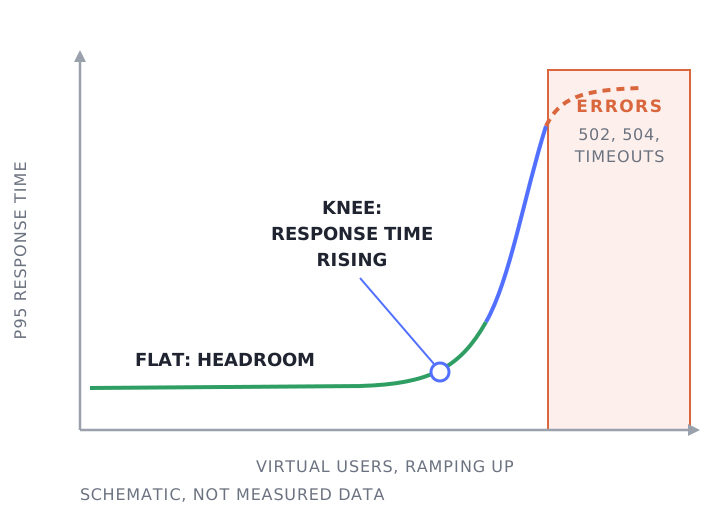
The end-of-test summary prints these lines:
| Line in the summary | What it tells you |
|---|---|
http_req_failed | The share of requests k6 counted as failed. The script’s rule aborts at 1% |
checks | The share of checks that passed, including “page has the logged-in marker” |
http_req_duration{kind:page} | Response times for member pages. Read the p(95) value |
http_req_duration{kind:login} | Response times for the login page and the login post |
http_req_duration{page:p1}, p2, and so on | The same, per page, in the order of your PAGES list (the script prints which is which at startup) |
warning_logins_with_shared_accounts | Counts logins by VUs that had to reuse another VU’s account. Appears only when that happens. Treat results as optimistic |
The summary aggregates the whole run, so it can’t show at what user count the curve bent. There are two ways to see that. Run k6’s built-in web dashboard, which “provides a real-time overview of the performance observed by k6 while a test is running” (k6 docs, web dashboard), by setting K6_WEB_DASHBOARD=true in front of the run command. Alternatively, repeat the same ramp and hold at several peak user counts (say 10, 25, 50 and 100). Whole-run p95 includes ramp-up and ramp-down; use time-series results to compare the peak holds.
What do slowdowns and errors mean?
Response times that climb with user count can indicate queuing for PHP workers, CPU, or the database. Errors mark a practical test limit only after you confirm whether they came from the origin, the firewall, the network, or the load generator.
A 502 is a gateway getting “an invalid response from the upstream server” (MDN, 502). A 504 means the gateway “did not get a response in time from the upstream server” (MDN, 504).
On a membership site, a common first suspect is the PHP worker pool, because logged-in pages typically bypass the page cache and each one occupies a worker while it is built. Our PHP workers guide and sizing calculator shows how to work out how many you need from your own peak. Our concurrent users page covers why hosting built for anonymous traffic struggles with this. If members report slowness only when logged in, our logged-in slowness runbook walks through the checks.
If you can watch the server during the test, a load average that stays above the number of CPU cores is a rule of thumb for taking a closer look. Brendan Gregg’s article on Linux load averages puts it this way: “If they are higher than your CPU count, then you might have a performance problem (it depends)” (Brendan Gregg). Ask your host for the PHP worker count in use, CPU, and the slow query log from the test window.
Be careful that the machine running k6 isn’t the bottleneck. A laptop on Wi-Fi can cap what it sends long before your server is stressed, so a flat curve from a weak test machine proves little. For larger tests, run k6 from a server with a good connection.
How do you compare two hosts fairly?
Test the same copy with the same script and CDN setup, then compare member-page http_req_duration p95. This measures sending, waiting and receiving, excluding initial DNS lookup and connection establishment; it is neither full browser load time nor isolated origin generation time. If both hosts expose comparable server timing or Query Monitor data, compare origin generation separately. Match the data and the object cache on both, or you are comparing setups.
- Same CDN. Use the same CDN setup to reduce edge-related differences.
- Same pages, logged in. Use the same
PAGESand the same test accounts. Anonymous page speed says little about members. - Same data. Restore the same database copy on both, so queries touch the same number of rows.
- Same object cache. If one host runs Redis or another object cache and the other doesn’t, you are measuring that difference. Turn it on for both or off for both.
- Same PHP version and plugins. A version difference can swamp a host difference.
- Repeat it. Run each test at least three times, at different times of day, and compare the middle result, not the best.
k6 defines http_req_duration as the “total time for the request”, “without the initial DNS lookup/connection times” (k6 docs, built-in metrics). Keep the load generator and its location identical: network travel still contributes to http_req_duration. Our WordPress server speed article shows a side-by-side test with Query Monitor.
What do we do in a free site speed audit?
We review how your site performs today, run synthetic load tests around concurrency and PHP worker usage, and send you a report with what we would change, whether or not you host with us.
If you would rather have a test run for you, or want a second pair of eyes on your results, get a free site speed audit. Before a launch, the 2026 concurrency guide is the place to start.
Frequently Asked Questions
How many virtual users should I test with?
Work back from your peak member page views per minute: VUs is roughly that rate times (think time plus response time) divided by 60. 300 member page views a minute, with a 10-second pause and a 2-second response, is about 60 VUs. Record the achieved request rate next to VUs and p95, because this script sends fewer requests per user as responses slow.
Can I load test a production membership site?
Only with care. Tell your host first, test during a quiet period, start with a small ramp, use test accounts, and keep payments out of it. A live test can also produce false failures if a CDN or firewall rate-limits your test traffic. A properly isolated copy usually gives cleaner results and reduces risk to real members.
What is the difference between load testing and stress testing?
A load test checks how the site performs at the traffic you expect. k6’s guide says average-load tests “assess how your system performs under expected normal conditions”, while stress tests “assess how a system performs at its limits when load exceeds the expected average” (k6 docs). This script can do either: set PEAK_VUS to your expected peak for a load test, or well above it to find the limit.
Will Cloudflare block my load test?
It can if a rate-limiting rule applies to the login endpoint. Agree the test with whoever manages your CDN and firewall, and allow the k6 source IP only for the test window.
Can I use this script to test checkout?
No, by design. It only sends GET requests to the pages you list, plus one login post per simulated member, and it rejects common high-risk path names such as checkout and cart (a denylist, not a security boundary). Checkout writes orders and calls a payment gateway, so test it by hand with your gateway in test mode.