


The Fastest WordPress Hosting for Membership Sites (2026)
A 100/100 PageSpeed score can hide slow logged-in pages. What actually makes membership hosting fast once members log in and the page cache stops helping.

For a membership site, “fast hosting” means one thing: how quickly the server builds a page for someone who is logged in. Almost every speed test you have run measures the opposite. It measures a logged-out visitor getting a page that was already built and sitting in a cache.
That is why a site can score 100 on PageSpeed and still take four seconds to load a course dashboard. The two numbers describe different work.
This post covers what to measure instead, the four things that decide logged-in speed, and the questions to ask a host before you move. Where a claim can be checked, it links to the source, including our competitors’ own documentation.
Why logged-in pages skip the cache
Page caching works by saving the finished HTML of a page and handing the same copy to everyone who asks. It is enormously effective, and it is why a brochure site runs fine on cheap hosting.
It stops working the moment a page has to differ per person. A course dashboard shows your progress. A members area shows your subscription. A community feed shows your groups. Serving one person’s copy to somebody else would be a privacy incident, so hosts commonly bypass shared page caching for logged-in or personalised requests.
That is not a MemberHost opinion. It is what the hosts document themselves:
- WP Engine bypasses its cache for
wp-admin,wp-login.php, pages named cart, checkout or store, and any request carrying awordpress_logged-in cookie (WP Engine caching docs, checked 15 September 2026). - Kinsta’s edge cache automatically bypasses wp-admin, cart, checkout and logged-in users (Kinsta edge caching docs, checked 15 September 2026).
- Rocket.net, which runs on Cloudflare Enterprise, lists what is never cached at the edge: “Logged-in user sessions, Personalized dashboard content, Dynamic cart/checkout elements” (Rocket.net support, checked 15 September 2026).
- BuddyBoss publishes the paths to exclude from page caching on a community site:
/members/*,/profile/*,/groups/*,/activity/*,/notifications/*,/messages/*(BuddyBoss docs, checked 15 September 2026).
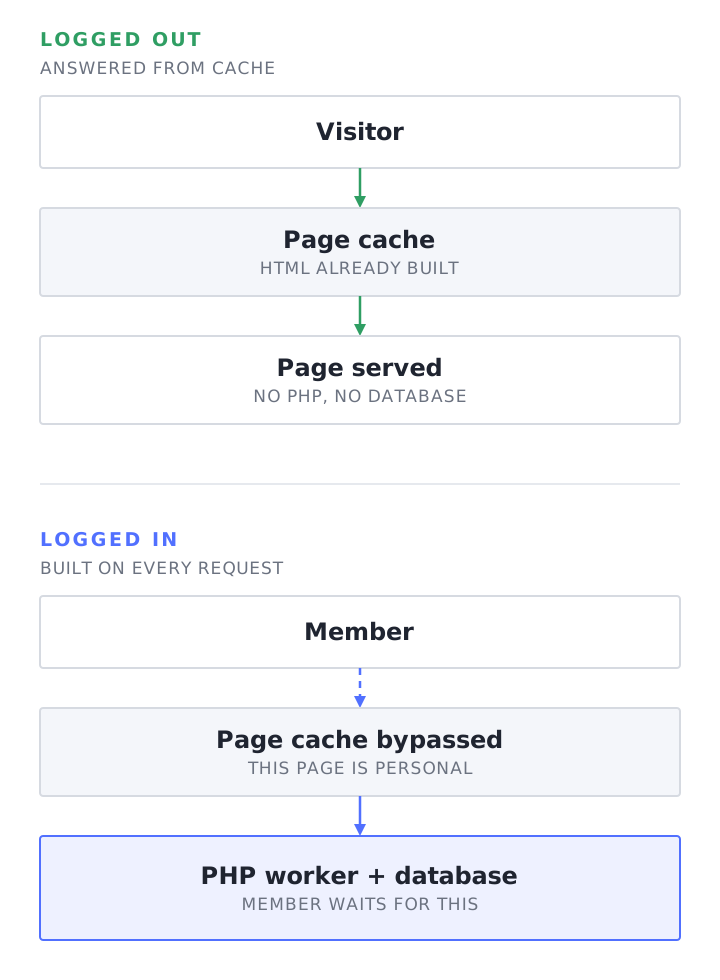
So on a membership site, the pages that make you money are the pages the cache cannot help with. Each of those requests is built from scratch: PHP runs, the database is queried, and the result is assembled while the member waits.
Your host’s job changes as a result. It is no longer “serve a cached file quickly”. It is “run PHP and MySQL quickly, many times at once”.
The four things that decide logged-in speed
1. How many requests the server can run at the same time
PHP-FPM handles requests with a pool of worker processes. Each one handles a single request at a time, and pm.max_children “sets the limit on the number of simultaneous requests that will be served” (PHP manual).
WP Engine’s explanation is the clearest one published: “think of these PHP Workers as cashiers in a store” (WP Engine). Ten cashiers serve ten shoppers at once. The eleventh shopper waits, however fast each cashier is.
When every worker is busy, new requests sit in the listen queue, and a request that waits too long ends in a gateway error, usually a 504 and sometimes a 502, depending on how the proxy in front is configured. Kinsta ties the two together directly, saying that on its smallest plans you can “encounter performance issues or 502 errors” and need to move up (Kinsta).
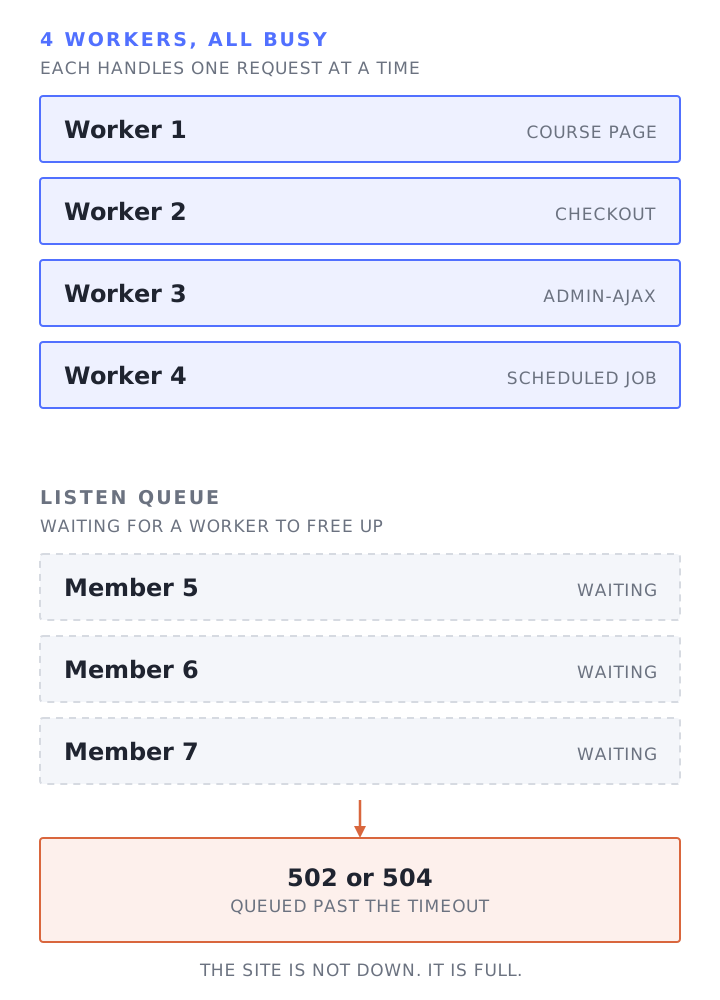
This is the number most hosts are quietest about. Kinsta publishes it, now calling them threads: four on the entry plan, 256MB each (Kinsta PHP docs, checked 15 September 2026). WP Engine explains the queue in detail but publishes no count per plan. On the pages we checked, SiteGround publishes no worker count either. It publishes a CPU seconds allowance instead, 1,000 an hour on its entry plan (SiteGround features, checked 15 September 2026).
2. How long each request holds a worker
A worker is occupied until its request finishes, so anything slow inside WordPress reduces how many members you can serve at once.
On membership stacks the usual suspects are documented:
- Cart fragments. WooCommerce’s developer blog explains that cart fragments were “enqueued on every page load… even if the mini-cart widget wasn’t present”, generating an admin-ajax request on every visit. It became opt-in in WooCommerce 7.8 (WooCommerce developer blog).
- Background jobs. Many membership, LMS and commerce plugins queue work through Action Scheduler, whose runner is started by WP-Cron and asynchronous loopback requests, so those jobs compete for the same workers as your members. Its documentation describes production queues “in excess of 50,000 jobs” (Action Scheduler).
- Community activity. BuddyPress records a user’s last activity on every logged-in page load through
bp_core_record_activity(), hooked towp_head(BuddyPress source). A comment on BuddyBoss’s own issue tracker puts it plainly: “Almost any performance issue from BuddyBoss is coming from the database requests” (BuddyBoss issue 323). BuddyBoss later published a round of query optimisation work on its directory pages (BuddyBoss).
Each of these is small on its own. Together, on a site with a few hundred members online, they decide whether the server keeps up.
3. Whether the database work is repeated or remembered
WordPress caches objects in memory during a request, then throws that away. The developer documentation is explicit: “By default, the object cache is non-persistent… resides in memory only for the duration of the request” (WordPress developer reference).
A persistent object cache, usually Redis, keeps those results between requests. On a membership site, where the same access rules and user meta get read on every uncacheable page, that can turn repeated reads into a single one. It only helps for data that WordPress and your plugins actually put in the cache, and a plugin that invalidates aggressively will still hit the database.
Two published measurements with methodology behind them, rather than the usual unsourced percentages:
- BuddyBoss measured a “35% reduction in database requests” from Redis on its own platform (BuddyBoss).
- Cloudways load tested 100 concurrent clients with Object Cache Pro and reported average response time falling from 1,056ms to 522ms (Cloudways).
One caveat, and it is not in most hosts’ interest to mention it. MemberPress lists the Redis Object Cache plugin among its known incompatibilities, says object caching “causes various problems”, and gives the solution as disabling it (MemberPress docs, checked 15 September 2026). MemberPress also recommends Kinsta as a host while advising against Kinsta’s Redis add-on (MemberPress hosting docs, checked 15 September 2026). Other vendors take the opposite position:
- LifterLMS says it “fully supports persistent object caching solutions, such as Redis and Memcached” (LifterLMS).
- Paid Memberships Pro’s own hosting docs call object caching safe “for almost every site”, while listing other cache plugins that conflict with its implementation (Paid Memberships Pro).
- BuddyBoss recommends Redis for performance (BuddyBoss).
So “does this host include Redis” is the wrong question on its own. Redis can back the WordPress object cache and hold query results, and getting both right is what keeps wp-admin usable as well as the front end. The better question is whether somebody will configure that for the plugins you actually run, and fix it when a plugin misbehaves.
Prices and inclusions differ sharply. Kinsta charges $100 a month per site for Redis (Kinsta Redis docs, checked 15 September 2026). Levamo includes Redis and KeyDB from its second tier up (Levamo pricing, checked 15 September 2026). WP Engine includes an object cache but does not publish what it runs on (WP Engine, checked 15 September 2026).
4. How resources are allocated
Ask how the host allocates CPU and memory, and what limits contention between customers. WP Engine’s pricing page lists “Shared resources” on standard plans, with horizontal scaling sold separately as Autoscale (WP Engine plans, checked 15 September 2026). SiteGround says it monitors consumption and limits accounts that exceed “their fair share” (SiteGround, checked 15 September 2026). Kinsta isolates each site in its own container (Kinsta, checked 15 September 2026).
None of that is dishonest. They are different products. The question is whether the one you are buying matches a site whose busiest hour is a launch, not an average Tuesday.
How to measure your own site properly
You can do all of this yourself, without a sales call.
Test while logged in. Open your dashboard or a course page as a real member with the browser devtools network tab open, and look at the Time To First Byte of the document request. Compare it with the same page logged out. If logged out is fast and logged in is slow, the problem is server-side work, not your images or your theme.
Find out what is slow inside WordPress. Install Query Monitor and look at page generation time, the number of database queries and which ones take longest, on a logged-in page. A dashboard making several hundred queries is telling you where the time goes.
Watch the workers. PHP-FPM publishes a status page showing active processes, the listen queue and how often “max children reached” fires, and the slow log dumps a backtrace for any request over a threshold (PHP-FPM status). If your host will not show you either, that is an answer in itself.
Load test the pages that matter. A test that hammers your homepage proves very little. Test logging in, opening a course and checking out, with a realistic number of concurrent users. We use loader.io and k6 for this.
What to ask a host before you move
- How many PHP workers does my plan get, and what happens when they are all busy?
- Is a persistent object cache included, or an add-on, and at what price?
- Which paths are excluded from the page cache for my stack, and who configures them?
- How are CPU and memory allocated to my site, and what stops another customer’s traffic from slowing it down?
- When a plugin conflict causes the slowdown, do you fix it or hand it back to me?
That last one separates managed hosting from infrastructure. Kinsta’s scope of support excludes “changes to the functionality of your site’s theme and plugins” (Kinsta, checked 15 September 2026). WP Engine’s says “Issues with plugin/theme functionality, bugs, and conflicts with WordPress core or your custom code are outside of our scope of support” (WP Engine, checked 15 September 2026). Cloudways excludes “debugging custom code” and plugin functionality changes from standard support (Cloudways, checked 15 September 2026). We set out what that means in practice in MemberHost vs Cloudways.
Those are reasonable boundaries for their businesses. They are also the exact boundary a membership site lands on, because the slow page is usually a plugin doing something expensive, not a broken server.
How we approach it
Everything above is the work we do before a site goes live: sizing PHP workers, CPU and memory against that site’s traffic rather than a plan tier, and excluding the logged-in paths from page caching. Pricing is per site for the same reason, so there is no tier to fit into. The detail is on our performance and concurrent users pages.
Caching in particular is built per client rather than switched on from a template. Which layers a site gets, how Redis is split between object caching and query results, what OPcache is tuned to, and which paths bypass the page cache all depend on the plugins in play and how members use the site. A generic host has to pick defaults that are safe for everyone, which is a reasonable answer for a brochure site and a poor one for a site where a wrong cache rule shows one member another member’s account.
The part that is harder to buy elsewhere is the plugin layer. MemberHost grew out of MemberFix, a membership site agency, so a slow course page caused by how a plugin queries the database is the kind of problem we work on rather than hand back.
If you want a read on your current setup, our free site speed audit looks at the logged-in pages, not only the homepage.
Frequently Asked Questions
Why does my site score 100 on PageSpeed but feel slow to members?
A public PageSpeed test loads the URL you give it as an anonymous visitor, which on most sites means a cached page. Member-facing pages skip that cache, so PHP and the database build them on every request. The two tests measure different work, and the second one is closer to what your members experience.
How many PHP workers does a membership site need?
It depends on how many members are active at once and how long each request takes, so any single number is marketing. As a starting point, GridPane sets pm.max_children to four workers per CPU core by default on new servers (GridPane, checked 15 September 2026). Treat that as a default rather than a sizing rule, and measure: watch the PHP-FPM status page under real load, then size from what you see.
Does a CDN make logged-in pages faster?
Mostly no. A CDN speeds up static files and cached HTML. Logged-in pages are excluded from edge caching by default at every host we checked, including Rocket.net, which runs Cloudflare Enterprise. The CDN still helps with images, CSS and JavaScript.
Is Redis always the answer for a membership site?
No. It usually helps a lot, but MemberPress currently lists the Redis Object Cache plugin as a known incompatibility and recommends disabling object caching, while LifterLMS supports it and Paid Memberships Pro calls it safe for almost every site. The answer depends on your plugin stack and who configures it.
What causes 502 and 504 errors during a launch?
Worker saturation is one common cause: requests queue, and when the queue outlasts the timeout the visitor gets a gateway error. Crashed PHP processes, an application timeout and network faults produce similar errors, so check the PHP-FPM queue metrics and the error log before assuming. When it is saturation, the fix is faster requests, more workers, or both.
Should I load test my site?
Yes, if you sell launches. Test the actions that cost you money: logging in, opening a course, checking out. A homepage load test mostly measures your cache.