


Reliable WordPress Hosting for Membership Sites (2026)
An uptime percentage says nothing about launch day. What reliability means for a membership site, what hosting SLAs actually pay out, and how to prepare.

Uptime monitoring checks whether your homepage answers. Your members are doing something harder: logging in, loading a course, posting in a group, paying for a renewal. A server can pass every monitoring check while those things time out.
That gap is where membership sites get hurt. It is also why an uptime percentage, on its own, tells you almost nothing about how a host behaves on the day you actually need it.
This post covers what the SLA you are being sold really promises, what takes membership sites down in practice, and what to have in place before a launch.
What hosting SLAs actually promise
An SLA has two halves: the target, and what happens when the target is missed. The second half is the one worth reading.
Checked on 15 September 2026:
- Kinsta’s SLA sets the Uptime Guarantee at 99.9% “unless a higher percentage is set forth in the Customer’s Order Form”. Credits are a percentage of the monthly subscription value, scaled by how much downtime there was, and only once downtime exceeds 43 minutes in the month, capped at that month’s fee (Kinsta SLA).
- WP Engine publishes 99.95% availability and pays 5% of the monthly fee per full hour of excess downtime, capped at the month’s fee (WP Engine SLA).
- Rocket.net’s pricing page advertises a “99.99% Uptime Guarantee” and does not state a credit remedy there (Rocket.net pricing).
- Levamo, formerly Rapyd Cloud, commits to 99.99% and publishes credits of 10%, 25% or 100% of the next month’s fees, excluding its cloud provider’s availability (Levamo SLA). More in MemberHost vs Levamo.
- MemberHost publishes 99.9% with a credit schedule in our SLA.
The percentage and the remedy describe different halves of the same promise, so read both. And note what every remedy on that list is: a credit against hosting fees. If a launch fails, that credit is a rounding error next to the revenue. An SLA is a statement of intent, not insurance, and it is worth reading as one.
What actually takes membership sites down
Hardware failure is the rare case. These are the causes worth checking first.
The server is saturated, not down. Every PHP worker is busy, new requests queue, and once the queue outlasts the timeout, members get a 502 or 504. Kinsta describes exactly this on its smaller plans (Kinsta). Monitoring often reports the site as up throughout, because the cached homepage still answers. The mechanics are in what actually makes membership hosting fast.
Background jobs pile up. Renewals, drip content and bulk email are queued work, and the queue runs on the same server as your members’ requests. The visible symptom is a site that gets slow at the same time every month, usually the day the renewals run. How that competes for PHP workers.
The database becomes the bottleneck. Community and LMS tables grow quickly, and some queries are expensive by design: BuddyPress writes a last-activity record on every logged-in page load (BuddyPress source). A site that was comfortable at 500 members can struggle at 5,000 without anything else changing.
A plugin update changes behaviour. A membership stack is a dozen plugins touching the same users, orders and access rules, and they ship on the vendors’ schedules, not yours.
Caching gets applied to the wrong pages. If logged-in pages are cached, members see each other’s content or stale access, which is worse than downtime. BuddyBoss publishes the paths to exclude (BuddyBoss docs), and its docs describe LiteSpeed’s “Cache Logged-In Users” setting causing profile pictures not to update (BuddyBoss).
Only one of those is the machine failing. The rest are the site doing more work than the environment was sized for, which is a planning problem more than a hardware one.
Monitor what members do, not whether the server answers
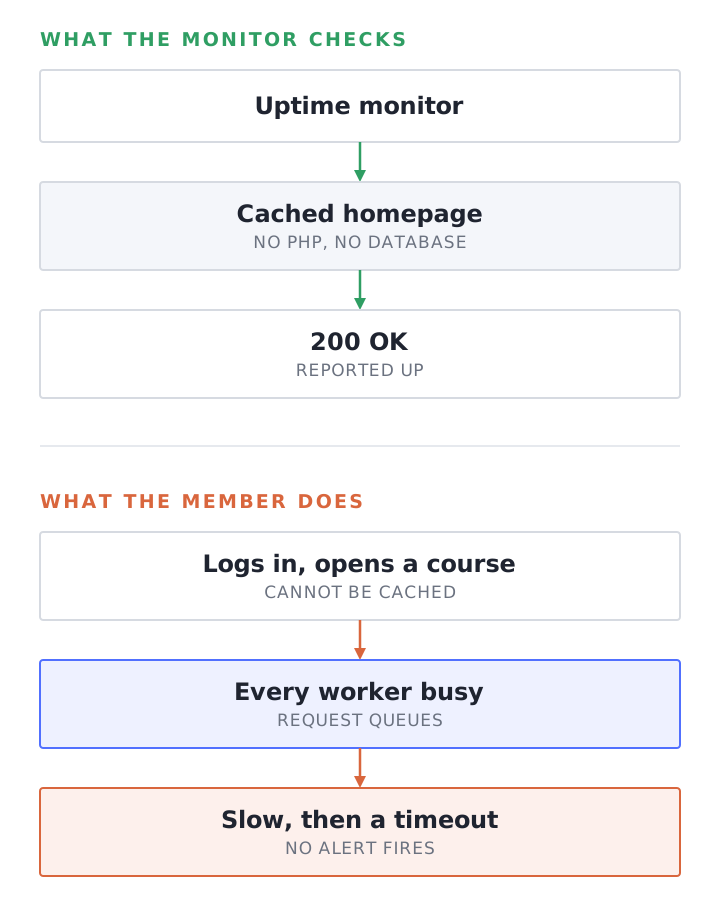
A useful check does what a member does. At minimum:
- Request a page that cannot be cached, while logged in, and assert on the content rather than the status code.
- Watch the checkout or signup endpoint separately.
- Alert on slow, not only on down. A site taking eight seconds is failing, and most monitors will call it up.
- Keep an eye on the queue: PHP-FPM’s status page reports active processes, the listen queue and “max children reached” (PHP-FPM status).
We use UptimeRobot for external checks and watch server resources directly, so a pattern gets looked at before a member reports it. The shape of the check matters more than the tool.
Failover sync, and what it actually protects you from
A synced standby is a second copy of your site, kept current, that can take traffic if the primary fails. At MemberHost that is failover sync, and it runs on clustered setups: a fully synced clone in parallel with the primary, a load balancer in front of both, and DNS routing traffic to the clone if the primary stops answering. It is described on our uptime page. A single node site does not have that second machine, which is worth knowing about your own plan whoever hosts it.
Be clear about what it protects you from. A clone covers the primary failing: hardware, the network, the machine becoming unreachable. It does not cover a bad plugin update, a database migration that goes wrong, or your workers being saturated by your own traffic, because the clone faithfully receives all of those too.
That distinction matters when you compare hosts, because “redundant” and “highly available” get used for very different architectures. Ask what fails over, how long the switch takes, and how much recent activity can be lost in the process. A host that answers those three precisely is telling you something real.
Backups are only as good as the last restore you tested
For a membership site the hard part is not the files, it is that orders, subscriptions and course progress keep moving. Restoring last night’s database means every signup, renewal and completed lesson since then is gone, and members notice the ones that involved money.
Worth settling before you need it:
- How often the database is backed up, and how far back copies go.
- How long a restore takes in practice, rather than in theory.
- Whether a single table or site can be restored without rolling everything back.
- Who runs the restore at 2am, you or the host.
Then test one. A backup nobody has restored is a belief, not a plan.
Before a launch
A launch is the one day your traffic is both concentrated and logged in. A short, boring checklist covers most of it:
- Load test the real path, not the homepage: log in, open a course, check out, with a realistic number of concurrent users.
- Watch the workers during that test. If the queue grows, adding more members will not end well.
- Freeze plugin updates for the week around the launch.
- Check the cache exclusions for your stack, logged in, on the pages members will actually hit.
- Move scheduled jobs out of the launch window where you can, especially renewal runs and large email sends.
- Know who to call, and whether that person can change plugin behaviour or only restart a server.
People skip the last one, and it decides how the day goes. Most managed hosts put plugin behaviour outside their support scope, which is a reasonable line for their businesses and the exact line a launch failure tends to fall on. The published wording from several hosts is quoted in the companion post on logged-in speed.
How we approach it
Our answer to most of the above is to size the environment to the site, tune its caching to the plugins it actually runs rather than to a template, keep a synced standby on clustered setups, and watch server resources rather than waiting for a ticket. What that covers is set out on the uptime and security pages, and the 99.9% commitment with its credit schedule is in the SLA.
When a launch is coming, we will load test the configuration with loader.io or k6 so the limits turn up in a test rather than in front of your members.
If you want that picture before your next launch, start with the free site speed audit.
Frequently Asked Questions
Is 99.9% uptime good enough for a membership site?
99.9% allows about 43 minutes of downtime a month. Whether that is acceptable depends less on the number than on when it happens: 43 minutes on a quiet Tuesday costs nothing, and ten minutes during a launch can cost a lot. Read the remedy alongside the target, and check whether the host publishes one at all.
Why does my monitoring say the site is up when members say it is down?
Most monitors request a cached page as an anonymous visitor, which keeps answering while the server is saturated. Check something a member does, while logged in, and alert on slow responses as well as failures.
What is the difference between a standby server and a cluster?
A standby is a synced copy that takes over if the primary fails. A cluster spreads traffic across several servers at once. A standby protects against the machine failing. Neither protects you from a bad deploy or from your own traffic overwhelming the environment.
How often should a membership site be backed up?
Often enough that the gap is survivable, because anything after the last backup is lost on restore, including orders and course progress. The more useful question is how quickly a restore completes, and whether you have tested one.
Do plugin updates cause outages?
They cause a fair share of incidents, because a membership stack has many plugins touching the same data. Update on a staging copy, freeze the launch window, and know how to roll back.
What should I do if my site goes down during a launch?
First work out whether it is down or saturated. If the cached homepage loads while logged-in pages time out, it is saturation. A restart can buy a few minutes by clearing stuck processes, but it will not fix capacity. Ask your host what the PHP-FPM queue looks like, cut the work per request where you can, and add capacity. Fix the cause afterwards, not during.