


Why Is BuddyBoss Slow? The Causes and the Fixes That Work
BuddyBoss slows down when a community outgrows its caching and hosting. The causes BuddyBoss documents itself, how to find yours with Query Monitor, and the fixes to try in order.

BuddyBoss gets slow when a community’s logged-in activity creates more server work than its setup was built for. Much of what a member sees is built for that member: their activity feed, their notification count, their message threads. An ordinary shared page cache can’t hand one member’s page to another, so that work goes back to PHP and the database, and when enough members are active at once, requests queue and pages drag.
BuddyBoss says as much in its own documentation. Page caching “isn’t really appropriate for a community platform with dynamic content, where each page loads something slightly different for each user. That means BuddyBoss needs to rely more on object caching” (BuddyBoss).
Most of the causes can be measured, and the bottleneck differs from one site to the next. Below: why the usual caching advice falls short, the causes BuddyBoss and WordPress document, how to find which one is hurting your site, and the fixes in the order we’d try them.
Sources include BuddyBoss’s documentation and articles, WordPress developer documentation, PHP’s and MemberPress’s documentation, and a case study from our sister agency MemberFix, checked on 19 September 2026. MemberHost is not affiliated with or endorsed by BuddyBoss. Where we give our own recommendation rather than theirs, we say so.
Why a BuddyBoss page isn’t cached like a blog post
A BuddyBoss page loads in two steps. In BuddyBoss’s words, “When a page first loads on BuddyBoss it generates the static HTML elements and then loads the dynamic content using AJAX. You will recognise this as the ‘Please wait…’ message or spinner you see when something is loading” (BuddyBoss).
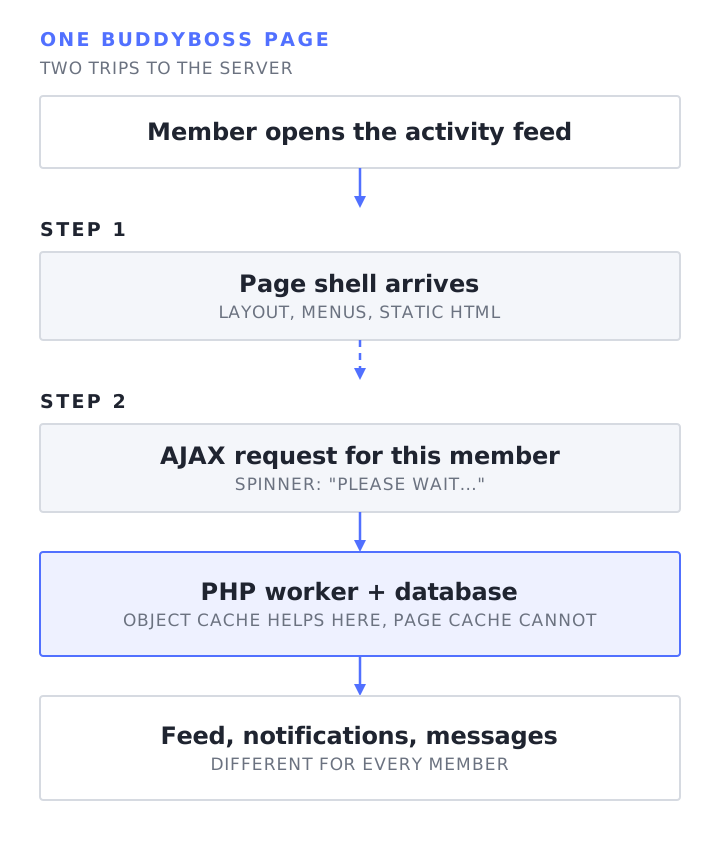
The spinner is the part your members wait on. BuddyBoss’s hosting guide warns that caching plugins such as “W3 Total Cache, Varnish, and Breeze” are “ineffective for dynamic communities, as they may serve outdated content to logged-in users” (BuddyBoss). The same guide says LiteSpeed Cache can give logged-in users fresh content, so caching for members isn’t impossible, but it needs per-user isolation and careful testing. Serving one member’s page to another is worse than a slow page. Our conservative recommendation is to keep members out of the shared page cache and lean on fast PHP, an object cache and lighter pages instead.
When someone tells you to “install a caching plugin” to fix a slow community, a standard full-page cache helps your logged-out visitors most: the homepage, the sales page, the blog.
The causes BuddyBoss and WordPress document
Feeds, notifications and messages write to the database all day
BuddyBoss says its “activity feed and messaging system generate high database write loads,” because “every post, reaction, comment, and notification creates database records.” Its conclusion: “At scale, unoptimized databases become the primary bottleneck” (BuddyBoss).
Those tables keep growing. BuddyBoss’s integrations page for the BP Bulk Delete plugin puts it plainly: “Large activity and notification tables slow down BuddyBoss page loads, increase backup times, and grow hosting costs on database-heavy hosting plans” (BuddyBoss). For scale, the test community BuddyBoss used for its own benchmark had about 55,000 members, 75,000 activity posts and 85,000 notifications (BuddyBoss).
WP-Cron is triggered by visits
WordPress’s built-in scheduler relies on site traffic. BuddyBoss’s own doc: “WP-Cron executes on every page load, which can slow down your site if long-running processes are triggered” (BuddyBoss). In practice a visit checks whether any scheduled jobs are due and starts them in a separate request, so heavy jobs such as email digests compete with members for the same server at busy times, and on quiet days they can run late.
Background requests nobody clicked
WordPress ships a polling system called the Heartbeat API. The client “sets up an interval (called the ‘tick’) to run every 15-120 seconds” and sends a request that “an admin-ajax handler” answers on the server (WordPress). Each of those is an uncached PHP request. We couldn’t find a BuddyBoss page that names Heartbeat as a cause, so treat it as something to check: if your browser’s network tab or your server logs show a steady stream of admin-ajax.php requests with action=heartbeat from members who are sitting on a page, it adds load.
If you run the BuddyBoss app, it talks to your site through API requests too. Include that traffic when you look at server load.
Images and scripts in the feed
BuddyBoss calls “Images in the activity feed” “the single biggest performance drain for most BuddyBoss communities. Every avatar, post image, and uploaded document adds to your server’s load” (BuddyBoss). Feed images affect download time and rendering in the member’s browser as well as load on your server. Measure which one matters on your site before you pick a fix.
Shared hosting and capped PHP workers
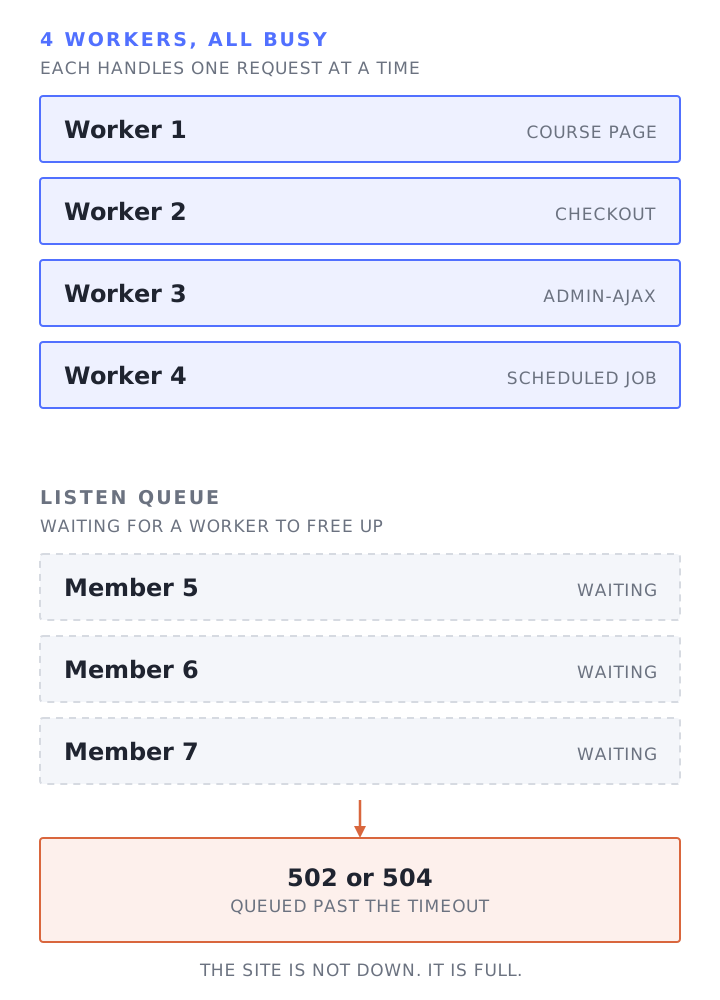
BuddyBoss is blunt about hosting. Community sites “generate higher server load per concurrent user; shared hosting often leads to slow performance” (BuddyBoss). Its pricing FAQ names the mechanism: “If your host caps workers and your traffic is highly concurrent, that is where slowdowns come from” (BuddyBoss).
A PHP worker handles one uncached request at a time. When every worker is busy, the next member’s request waits in line. That’s how a community can feel fine at 9am and crawl at 7pm when a live session starts: same code, more members asking for uncached pages at once. Our concurrent users page covers this in more detail.
How to find out which one is hurting your site
Measure the bottleneck before you choose a bigger hosting plan. BuddyBoss’s advice when the standard fixes don’t work is to “Profile your site with tools like Query Monitor to pinpoint slow queries or scripts, then address the specific bottleneck” (BuddyBoss). A practical order:
- Split server time from browser time. Open a slow member page with your browser’s developer tools on the Network tab and find the requests that take longest, including the AJAX calls that fill in the feed. Each request’s Timing breakdown shows how long it waited for the server’s first byte, which includes network time, so confirm a suspected server delay with your host’s server measurements. If downloads finish well before the page looks ready, record a Performance profile to see whether scripts and rendering are the delay.
- Install Query Monitor and load the slow page as an admin. Look at the total query count and time, the slowest queries, and which plugin or component each one comes from. Its toolbar covers the page request itself, not the AJAX requests that load afterwards, so if the slow part is the feed, have a developer profile that AJAX request. BuddyBoss’s scaling guide treats more than 50 database queries per page as high (BuddyBoss). Take any very slow query to your developer: the duration tells you where to look, not why.
- Check whether a persistent object cache is in use. Query Monitor’s overview panel reports on the object cache. Check that it says a persistent cache is in use, not only a hit rate: without one, WordPress still caches repeated operations within a single page load, just not across page loads (Query Monitor).
- Check how scheduled jobs run. Ask your host whether WP-Cron is triggered by visits or by a server scheduler, and look for overdue jobs.
- Watch the network tab for background requests. Repeated
admin-ajax.phporwp-jsoncalls while you sit on a page may be polling. Check each one’s action or route and what started it to find out what it is. - Ask your host how many PHP workers you have, and whether they were all busy at your slow times. Worker saturation, CPU or memory pressure, or database contention at those times show where the bottleneck is. Then your host or developer can judge whether to make requests cheaper, change the configuration, or add capacity.
- Count rows in the activity and notification tables. Hundreds of thousands of rows are a reason to look at cleanup.
The fixes, in the order we’d try them
1. Use BuddyBoss’s own Performance settings
Under BuddyBoss > Settings > Performance you can cut how many requests the activity feed makes. BuddyBoss reduced the default “from four to two for the activity feed” and suggests that “If your hosting environment supports it, adjust the setting to one page request for even faster loading.” It also says to “review any third-party plugins or custom code for potential conflicts when lowering this setting.” You can also lower posts per activity page to 5, 10 or 15; the default is now 10, down from 20 (BuddyBoss). Test the lower setting on staging, and check third-party plugins and custom code for conflicts, before changing it on the live site.
2. Test object caching on staging, then turn it on
This is BuddyBoss’s main recommendation: “Redis Object Cache: Install and enable Redis for faster database lookups” (BuddyBoss). In its own benchmark, “Redis Object Caching was responsible for an average reduction of 35% in database requests compared to the same test run with caching disabled,” and 60% on the groups directory, forums and single forum pages (BuddyBoss).
Two cautions. Persistent object caching needs a Redis or Memcached service your site can reach, so ask your host whether your plan supports it and what limits apply. And if BuddyBoss sits next to other membership plugins, test them with object caching on. MemberPress, for example, lists the Redis Object Cache plugin among its incompatibilities and advises “Disable object caching” (MemberPress). Run sign-ups, logins and access rules on a staging copy before you switch it on in production.
3. Keep page caching for logged-out visitors
BuddyBoss’s troubleshooting doc advises “a single, well-configured caching solution” and warns against “overlapping page or asset minifiers that can conflict” (BuddyBoss). The BuddyBoss pages cited here don’t give a complete list of what to exclude, so the following are our suggested starting points for testing, not BuddyBoss’s:
- Don’t serve shared cached pages to logged-in users. WordPress normally sets a
wordpress_logged_in_cookie after login (WordPress); ask your host how its cache detects signed-in members. - Map the pages your site actually uses: BuddyBoss’s activity, members, groups, messages, notifications, registration and activation pages, plus your membership plugin’s checkout, account, login and password reset pages. Exclude the ones that change per visitor or per session at every cache layer you run (plugin, server and CDN).
- Exclude
wp-admin,admin-ajax.phpand authenticated REST API calls. - Keep the page cache for marketing pages, the blog and anything else that’s the same for everyone.
- Test before production: browse logged out, then as two different test members, and check each sees only their own content.
4. Move WP-Cron to a real scheduler
BuddyBoss recommends running WP-Cron “via the system scheduler (Linux crontab) instead of the default WordPress method,” with define('DISABLE_WP_CRON', true); in wp-config.php (BuddyBoss). Order matters: set up and test the server scheduler first, then disable the visit-triggered version, as WordPress’s own guide lays out (WordPress). Afterwards, check that scheduled jobs such as email digests still run on time.
5. Clean out old activity and notifications
For older communities, BuddyBoss points to BP Bulk Delete, which lets admins “bulk delete old activity posts, group activity, private messages, and notifications based on an ‘older than’ date filter” (BuddyBoss). Take a backup first and agree with your community team what counts as old. Getting deleted activity back means restoring that backup.
6. Shrink the front end
BuddyBoss’s troubleshooting doc recommends compressing images and minifying CSS and JavaScript, and BuddyBoss features Autoptimize on its integrations page (BuddyBoss, BuddyBoss). The same troubleshooting doc says to “Deactivate and delete inactive or seldom-used plugins to free memory and reduce background tasks.” Plugins can add work to requests or run jobs in the background, so profile them first, check nothing depends on them, and test deactivation on staging before deleting anything.
7. Match the hosting to the evidence
If you’ve worked through the steps above and the measurements still show workers maxed out, CPU or memory under pressure, or the database struggling at busy times, have your host or developer work out whether cheaper requests, a configuration change or more capacity is the answer. When it’s capacity, BuddyBoss recommends “at least a VPS or dedicated environment for community sites” (BuddyBoss). What to look for: enough PHP workers for your busiest hour, a database that isn’t competing with other people’s sites, and an object cache your site can reach. Run a PHP version that is still supported by PHP and that your theme and plugins work with, tested on staging.
What BuddyBoss’s own benchmark shows, and what it doesn’t
BuddyBoss published numbers comparing Platform 1.8.7 with the 1.9 beta performance version. On an 8 vCPU, 16 GB AWS server with Redis and its 55,000-member test database, it reported “an average of almost 50% fewer database requests across the key platform pages,” and its single activity post AJAX request handled “181% more requests in 30 seconds with 100 concurrent users” (BuddyBoss).
Keep BuddyBoss updated, since the platform itself has had real performance work. And read these as BuddyBoss’s comparison of two of its own versions on one test server, with Redis on, not as a prediction of how fast your community will be on your hosting.
When it’s time to get help
If Query Monitor points at a few slow queries from one plugin, a developer can often fix those directly. If pages are slow across the board and the server measurements show resources running out at busy times, the fix may be configuration, cheaper requests or more capacity, and it takes someone with access to the server to tell which. Our sister agency, MemberFix, has built BuddyBoss communities such as the TechServe Alliance member hub, and that site runs on MemberHost.
Want a second pair of eyes on yours? Start with our free site speed audit. More on how we host communities is on our BuddyBoss hosting page.
Frequently Asked Questions
Can BuddyBoss run on shared hosting?
Technically yes, but BuddyBoss itself says “performance can degrade quickly as traffic grows” and recommends “at least a VPS or dedicated environment for community sites” (BuddyBoss). Before choosing a plan, ask whether it supports a persistent object cache and how many PHP requests your site can run at once.
Why is BuddyBoss slow only for logged-in members?
Members’ pages usually skip the shared page cache because each member sees their own feed, notifications and messages. Those requests run PHP and often query the database. Logged-out pages can be cached, which is why the homepage can feel fast while the activity feed doesn’t.
Does a caching plugin fix a slow BuddyBoss site?
A standard full-page cache mostly helps logged-out visitors. For members, BuddyBoss relies on object caching, such as Redis (BuddyBoss), where it’s compatible with your plugins. Front-end optimization helps when downloads or rendering are part of the delay. Caching pages for logged-in users needs per-user isolation and testing, or members can see stale or wrong content.
What is the single biggest fix for a slow BuddyBoss site?
It depends on the cause, which is why we’d measure first with Query Monitor and the browser’s network tab. Persistent object caching may help when it’s compatible with your plugins; BuddyBoss’s benchmark measured 35% fewer database requests with Redis on. Test it first, especially with MemberPress, whose documentation lists Redis Object Cache as an incompatibility.
Does BuddyBoss get slower as the community grows?
It can. Posts, messages, reactions and notifications add database records over time, and BuddyBoss says “Large activity and notification tables slow down BuddyBoss page loads” (BuddyBoss). More members online at once also means more uncached requests competing for the same PHP workers.