What if your perfect PageSpeed score is actually a lie? For creators searching for the fastest wordpress hosting for membership sites, a 100/100 score for anonymous visitors is often a mask for a failing backend. The moment a student logs in, static caching vanishes. The server finally has to work. If you've ever watched your dashboard crawl during a major course launch while generic support agents shrug, you know the frustration. It's a specialized pain that standard hosts simply aren't built to solve. They're optimized for static blogs, not dynamic, high-concurrency engines.
We agree that your members deserve better than “good enough” uptime. You need a platform that treats logged-in performance as the priority, not an afterthought. In this guide, you'll discover why traditional speed metrics fail dynamic sites and how clustered architecture provides the only true path to sub-second page loads for your paying users. We're moving beyond basic caching. We'll preview the technical pillars of 2026 hosting, including failover sync technology and isolated containers that guarantee 100% uptime even during your highest-concurrency events. It's time to stop settling for generic infrastructure and start building on a stack designed for your specific tech needs.
Key Takeaways
- Static caching is for blogs; learn why dynamic requests require a completely different architectural approach to maintain speed for logged-in users.
- Stop worrying about server crashes during major launches by utilizing clustered environments that distribute heavy loads across multiple nodes.
- Identify the metrics that actually impact your members, focusing on concurrent user capacity and mandatory object caching like Redis.
- Secure your revenue with failover sync technology, ensuring 100% uptime even when individual hardware components fail.
- Discover how the fastest wordpress hosting for membership sites uses custom-configured stacks to optimize specific plugins like LearnDash and other popular membership solutions.
Table of Contents
- The Membership Speed Paradox: Why Standard "Fast" Hosting Fails
- The Architecture of Speed: Clustered Environments vs. Single Servers
- Evaluating the "Fastest" Claims: Metrics That Actually Matter
- Performance Optimization Beyond the Server: The Custom Stack
- Why MemberHost is the Final Speed Upgrade for Growing Platforms
The Membership Speed Paradox: Why Standard “Fast” Hosting Fails
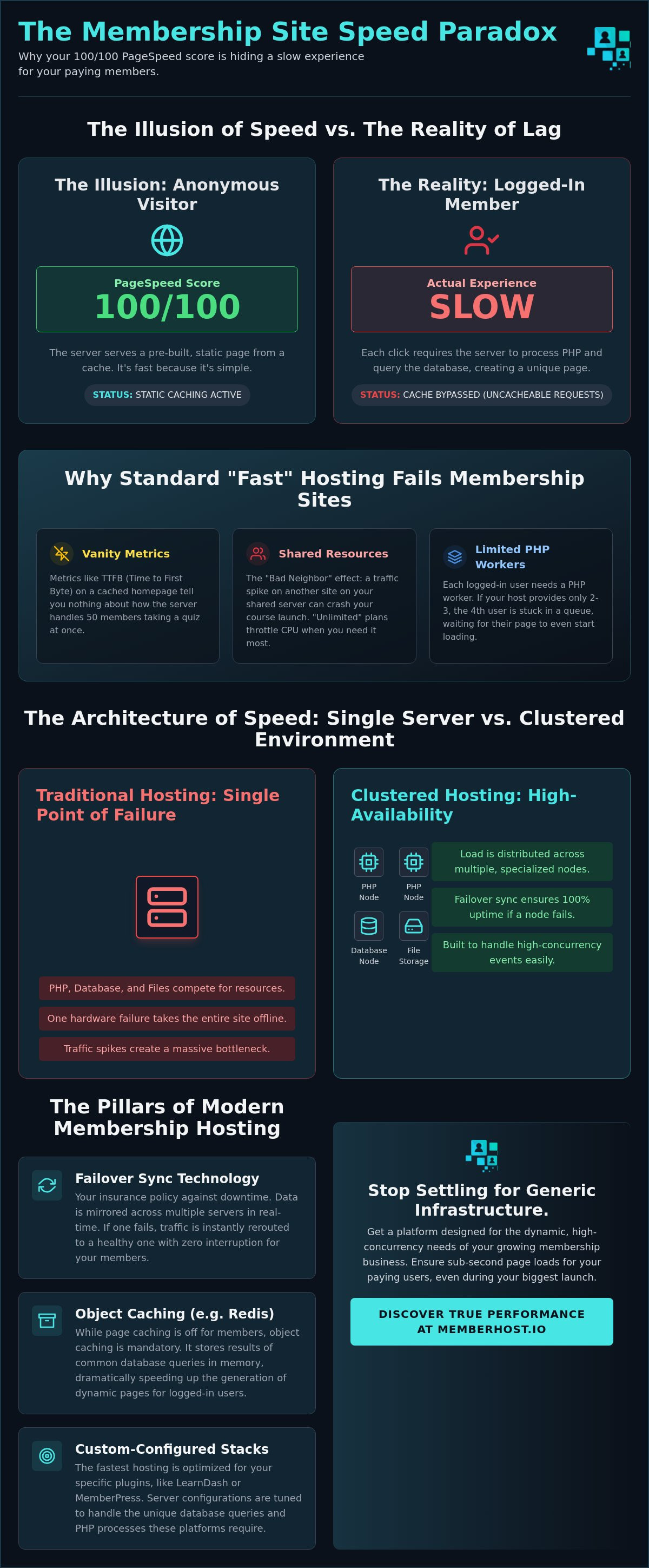
The industry has a dirty secret. Most providers claim to be the fastest wordpress hosting for membership sites by showing you benchmarks of a static homepage. It's a hollow victory. Static content delivery is easy; the server just hands over a pre-packaged file. Dynamic user requests are the complete opposite. Every time a member clicks their profile or a course lesson, the server has to talk to the database, process PHP, and assemble a unique page just for them.
Standard “Managed WordPress” caching is built to ignore these requests. If a host cached your member's dashboard, the next person to log in might see that member's private data. To prevent this, caching layers are disabled for logged-in users. This creates the “Logged-In Lag” effect. Your site looks lightning-fast to you when you're logged out, but it feels like it's running through molasses for your paying customers. Uncacheable Requests, defined as any server query that must bypass the cache to generate unique data for a specific user, are the primary performance killer in 2026.
While a Content Delivery Network (CDN) can speed up your images and CSS, it cannot “solve” a slow PHP execution. Your membership functionality, including carts and dashboards, depends entirely on the server's raw processing power. When that power is lacking, the user experience crumbles.
The Myth of TTFB for Membership Sites
Time to First Byte (TTFB) is the vanity metric of the hosting world. A low TTFB on your landing page tells us nothing about how your site handles 50 students taking a quiz simultaneously. For a membership site, the real bottlenecks are PHP workers and memory limits. When a member logs in, they bypass the cache and hit a PHP worker. If your host only gives you two or three workers, the fourth user is stuck in a queue. Generic speed test tools won't show you this. They only see the cached shell, not the struggling engine underneath.
Why Shared Resources Are a Launch-Day Death Sentence
Shared hosting is a gamble where you're the house, and the house always loses. In these environments, you're fighting for CPU cycles with hundreds of other sites. This is the “Bad Neighbor” effect. If another site on your server has a traffic spike, your course launch suffers. “Unlimited” plans are a marketing myth. They actually throttle your CPU the moment your members start making dynamic requests. True scale requires dedicated, scalable compute power that doesn't vanish when you finally get the traffic you've worked for.
The Architecture of Speed: Clustered Environments vs. Single Servers
Traditional hosting is a trap. Most providers sell you a “Single Point of Failure” wrapped in fancy marketing. In these setups, one server handles your database, your PHP execution, and your file storage. When your membership site grows, that single machine becomes a bottleneck. If the hardware fails or the traffic spikes, your entire business goes dark. Clustered environments eliminate this risk by distributing the load across multiple specialized nodes. It's the difference between a one-man shop and a high-performance pit crew.
For a dynamic community, the database is the most taxed component. Every time a member tracks their progress or posts in a forum, the server runs a query. By using dedicated database servers within a cluster, those queries don't have to compete with PHP processing for resources. This architectural shift is why finding the fastest wordpress hosting for membership sites often leads experts away from standard VPS plans and toward clustered solutions. When we look at objective measurements and perceived user experience, the performance gap between a single server and a specialized cluster is staggering. If your current setup feels sluggish during peak hours, you might benefit from a free site speed audit to identify your specific bottlenecks.
Understanding Failover Sync Technology
Failover sync technology is your insurance policy against downtime. In a clustered environment, your data isn't just sitting on one disk; it's mirrored across multiple server nodes in real-time. If one node experiences a hardware failure, the system detects it instantly. Traffic is rerouted to a healthy node without your members ever noticing a glitch. For sites processing payments and hosting live events 24/7, this level of redundancy isn't a luxury. It's a requirement for survival.
Clustered vs. VPS: Which One Actually Scales?
A Virtual Private Server (VPS) scales vertically. You add more RAM or more CPU to the same machine. But every machine has a ceiling. Once you hit that limit, you're forced into a complex site migration to a larger box. Clustering allows for horizontal scaling. Need more power? You just add another node to the cluster. There's no migration, no downtime, and no technical debt. While the initial investment in a clustered environment is higher than a cheap VPS, the long-term cost of lost revenue during a crash makes the choice clear for serious platforms.
Evaluating the “Fastest” Claims: Metrics That Actually Matter
Stop looking at Time to First Byte (TTFB) for your homepage. It's a distraction. When searching for the fastest wordpress hosting for membership sites, the only metric that dictates your success is concurrent user capacity. Standard benchmarks test how fast a server can hand out a static file to a robot. That's easy. Your challenge is different. You need to know how the server behaves when 50 students are simultaneously saving quiz progress and 20 more are hitting the checkout page. If the server chokes under that pressure, your “fast” hosting is a failure.
The resource math is brutal. 100 concurrent logged-in users require 5x the resources of 10,000 static visitors. While a static visitor barely touches your CPU, a logged-in member triggers a cascade of database queries and PHP executions. This is where PHP worker counts become your primary constraint. Think of PHP workers as the checkout lanes in a grocery store. If you have 500 customers but only two lanes, your store grinds to a halt. For a growing community, you don't just need high-end hardware. You need enough workers to handle your peak traffic spikes without queuing requests.
The Role of Object Caching in Database Speed
Object caching is no longer optional. It's mandatory. Tools like Redis sit between your PHP application and your MySQL database. They store the results of frequent database queries in the server's RAM. Instead of asking the database for a member's profile data every time they refresh a page, the server grabs it from the lightning-fast cache. This reduces the load on your database significantly. Persistent object caching is the secret to fast member profiles and smooth dashboard navigation. Look for hosts that provide server-side Redis as a standard feature, not a paid add-on that requires complex configuration.
Testing Your Site for Concurrency
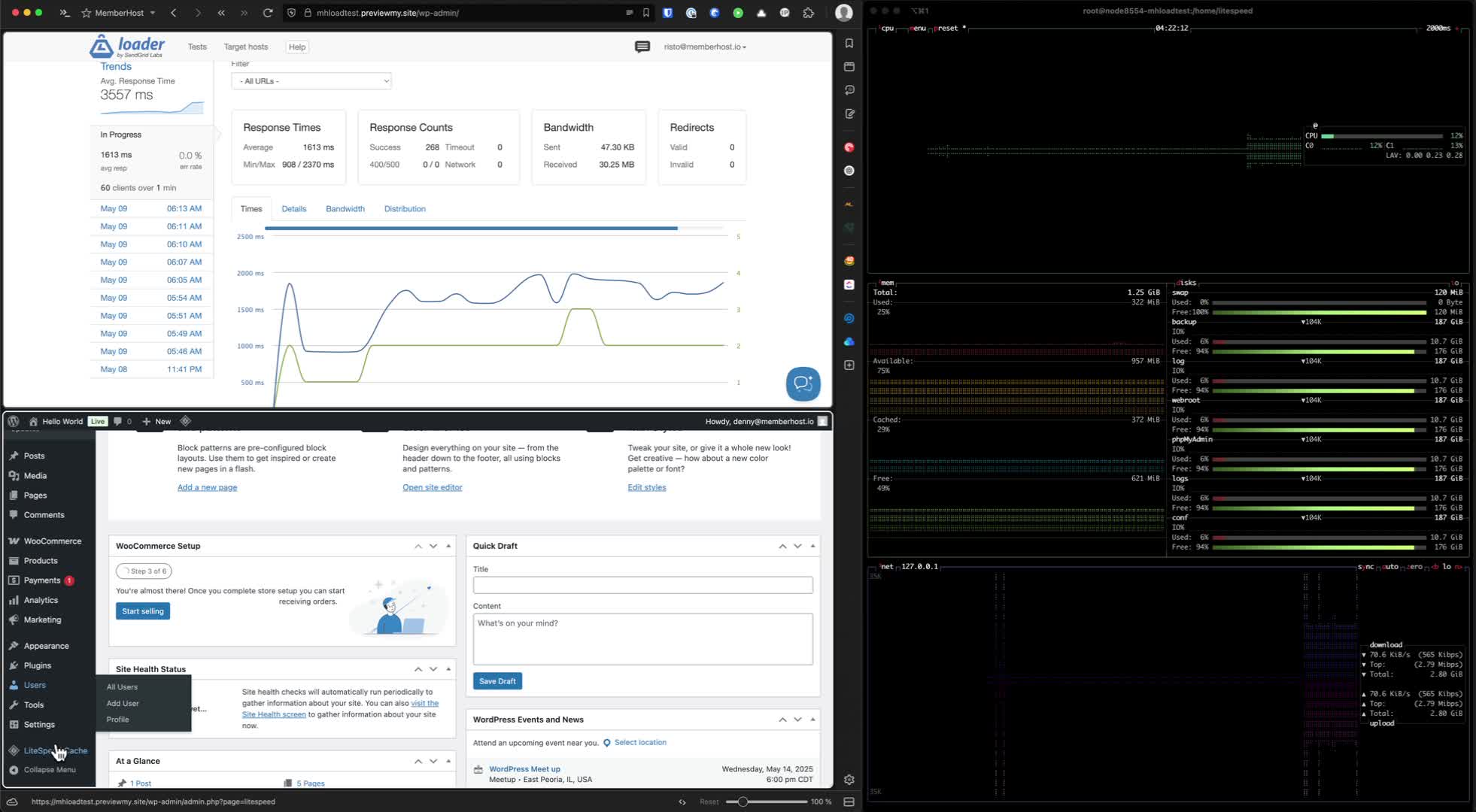
Don't guess. Test. Use professional tools like K6 or Loader.io to simulate real-world member behavior. A standard speed test won't reveal the truth. You need to see a “Response Time vs. Users” graph. In a healthy environment, the response time should stay flat as the user count climbs. A sudden, sharp spike in response time is a massive red flag. It means your server has run out of PHP workers or hit a memory ceiling. If your site's performance degrades the moment ten people log in, your hosting isn't actually fast. It's just a well-painted facade that collapses under real-world use.
Performance Optimization Beyond the Server: The Custom Stack
A generic server is a performance prison. Most “Managed WordPress” providers use the same cookie-cutter configuration for a five-page brochure site as they do for a 5,000-member eLearning platform. It's inefficient. It's lazy. To achieve the title of the fastest wordpress hosting for membership sites, we have to look past the hardware. The real magic happens when you align the server's behavior with the specific demands of your tech stack. One-size-fits-all is a bottleneck that your growing business can't afford.
Your choice of membership software dictates your resource requirements. LearnDash, MemberPress, and BuddyBoss aren't just simple additions to your site. They are resource-heavy applications that live inside WordPress. Each one interacts with the database in unique, often taxing ways. If your host treats these interactions like standard blog traffic, your performance will suffer. WordPress level performance optimization means looking at the code, the queries, and the specific plugin overhead to ensure the infrastructure supports the application, not just the CMS.
Custom-Configured Environments for Membership Plugins
Optimization starts with the environment. High-memory plugins require specific PHP settings that go beyond the standard “out of the box” limits. We're talking about tailored PHP-FPM configurations and MySQL buffers designed specifically for massive user meta tables. If your database isn't tuned to handle the complex relational queries common in community sites, no amount of raw CPU power will save you. Your host should understand your tech stack as deeply as you do. They should know exactly why a BuddyBoss activity feed requires different resource allocation than a LearnDash quiz. Precision matters.
The Free Site Speed Audit: Finding the Real Culprit
Stop chasing scores. A 98/100 on a generic speed test is meaningless if your members are waiting five seconds for their private dashboard to load. Those tools only see what's on the surface. A professional audit looks at the real user experience. It identifies the hidden code bottlenecks, the redundant database calls, and the plugin conflicts that slow down your site from the inside out. There is a massive difference between a synthetic “score” and the actual speed your members feel when they're logged in.
We believe in transparency over guesswork. That's why we offer a deep-dive analysis of your current setup. Learn more about our free site speed audit to uncover the specific issues holding your platform back. Whether it's a slow query from an outdated plugin or a misconfigured object cache, we find the real culprit. Don't let hidden technical debt kill your growth. If you're ready for a platform that understands your specific needs, it's time to explore a custom-configured clustered environment built for elite speed.
Why MemberHost is the Final Speed Upgrade for Growing Platforms
Generic hosting is a race to the bottom. Most providers optimize for their own profit margins, not your site's performance. They cram thousands of users onto aging hardware and hope your membership plugin doesn't trigger an alarm. At MemberHost, we take the opposite approach. We're obsessed with technical excellence for niche communities. We don't just provide a server; we provide a custom-configured clustered environment designed to handle the specific, heavy-lifting demands of dynamic user interactions. It's a specialized solution for a specialized problem.
Finding the fastest wordpress hosting for membership sites isn't about looking for the lowest price. It's about finding the highest ceiling. When you move beyond the limitations of single-server setups, you eliminate the “Launch Anxiety” that keeps course creators awake at night. You shouldn't have to cross your fingers and hope your site stays online when your email list hits a link. With our proactive reliability and infrastructure designed for high concurrency, your platform remains stable while you focus on what actually matters: your members.
Boutique Service vs. Mass-Market Indifference
Big Hosting fails when you need it most. If you've ever faced a 502 Bad Gateway during a high-stakes launch, you know that a generic support agent reading from a script is useless. They don't understand how MemberPress queries interact with your database. They don't know why LearnDash is taxing your PHP workers. We do. Our commitment to WordPress-level performance optimization means we act as your technical partner. We manage the infrastructure with a level of precision that mass-market competitors simply can't match. We're the knowledgeable ally you need to navigate the complexities of a growing community.
Ready for Your Last Migration?
The fear of a messy migration often keeps site owners trapped on slow, unreliable hosts. We've eliminated that hurdle. Our team handles the heavy lifting of complex site migrations, ensuring your data, users, and subscriptions move over without a glitch. You get the immediate benefit of failover sync technology and the elite-level speed of a cluster without the technical headache. It's time to stop settling for average outcomes and start building on a foundation that can actually scale with your vision.
Don't let your hosting be the bottleneck that kills your momentum. It's time to experience the security and performance of a stack built specifically for you. Get your free site speed audit and upgrade to MemberHost today. Your members deserve a sub-second experience, and your business deserves a platform that never blinks.
Own Your Infrastructure, Own Your Growth
Static caching is a vanity metric. It collapses the moment your members log in. We've shown that true performance in 2026 requires moving beyond single-server limitations. To secure your revenue and your reputation, you need an architecture built for high-concurrency events and dynamic requests. Clustered environments aren't just a technical upgrade; they're the foundation of a stable, scalable business. You deserve a platform that doesn't blink when your traffic spikes.
Finding the fastest wordpress hosting for membership sites means looking for a partner who understands your specific tech stack. Whether it's specialized failover sync technology or custom-configured clustered environments, the infrastructure must align with your goals. Don't let your next course launch be a gamble against mass-market indifference. It's time to build on a platform that treats your logged-in performance as the priority it is.
Stop the lag and secure your launch with MemberHost. Start with a free professional site speed audit to see exactly where your current setup is failing. Your community is ready for elite speed. It's time you gave it to them.
Frequently Asked Questions
Is managed WordPress hosting worth it for a small membership site?
Yes, because even a small membership site is significantly more resource-intensive than a standard blog. Shared hosting environments often throttle your CPU the moment a user logs in. Investing in a managed solution ensures your database and PHP execution are optimized, which is essential for maintaining a professional user experience from day one. It's about preventing the “Logged-In Lag” before it drives your early members away.
Can I use a CDN to make my membership site faster for logged-in users?
A CDN only speeds up static assets like images, CSS, and JavaScript. It does nothing for the dynamic, uncacheable requests that drive your membership dashboard or checkout page. While a CDN is a helpful addition, the fastest wordpress hosting for membership sites must focus on server-side processing power to handle the heavy lifting of logged-in user sessions. Your server, not the edge, is the bottleneck for members.
How many PHP workers do I need for my membership site?
Most small communities require at least 4 to 6 PHP workers to handle basic concurrent activity without queuing. If you're running a major course launch with hundreds of simultaneous logins, that number needs to scale significantly. We analyze your specific plugin stack and traffic patterns to ensure your worker count never becomes a bottleneck during peak events. It's the only way to avoid the dreaded “request queuing.”
What is the difference between clustered hosting and a standard VPS?
A standard VPS is a single virtual machine; if it fails or hits its resource ceiling, your site goes down. Clustered hosting distributes your site across multiple specialized nodes. This architecture allows for horizontal scaling and eliminates the “Single Point of Failure” inherent in VPS setups. It's the difference between a single engine and a multi-node powerhouse designed for 100% uptime.
Why does my membership site crash during a course launch?
Launches create high concurrency, where many users try to access the database and execute PHP at the exact same time. On traditional servers, this exhausts your available PHP workers or CPU cycles instantly. Without a clustered environment to distribute this sudden load, the server simply stops responding. Proactive reliability requires infrastructure that can absorb these spikes without blinking, replacing launch anxiety with total security.
Does MemberHost provide a free site speed audit before I migrate?
Yes, we offer a free professional site speed audit to identify the specific bottlenecks in your current setup. We look beyond generic scores to analyze database queries, plugin conflicts, and server response times. This ensures your migration isn't just a move to a new box, but a genuine performance upgrade tailored to your specific community. We find the real culprits before you even move.
Can I host a Moodle site alongside my WordPress community?
You can, but Moodle and WordPress have very different architectural requirements. Hosting them together on a standard server often leads to resource contention. In a clustered environment, we can isolate these workloads to ensure your LMS doesn't slow down your community forums. It's about precision resource allocation. We ensure every part of your tech stack has the dedicated compute power it needs to perform.
How does failover sync technology prevent data loss during a crash?
Failover sync technology mirrors your database and files across multiple server nodes in real-time. If the primary node experiences a hardware failure, the system automatically switches to a secondary node with an identical copy of your data. This happens instantly. Your members never lose their progress, and your business never loses a transaction. It's the ultimate insurance policy for your digital revenue.